The Ultimate File & Photo Tweaking Tool for MacOS
File Multi Tool 7 allows you to change JPEG, RAW & video content creation
dates, EXIF, IPTC & GPS meta-data tags, file creation & modification dates,
file flags and deal with invisible files.
File Multi Tool is the Mac App Store version of A Better Finder Attributes 7.
Correct EXIF Digital Photo & Video Shooting Timestamps
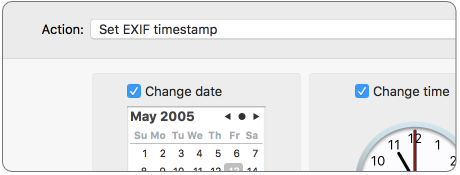
File Multi Tool 7 allows you to manipulate JPEG, RAW &
video content creation timestamps (EXIF DateTimeOriginal, DateTimeDigitized, video content and media creation dates) at will by setting them to specific times or batch adjusting them by adding
and removing time (useful for correcting the timestamps of images taken with a digital camera with a
incorrectly set clock and to compensate for timezone changes).
Correct Finder Sorting for Digital Photos & Videos
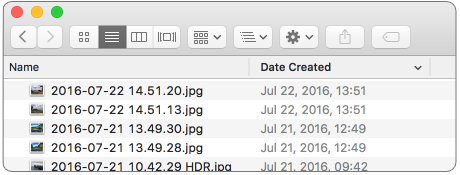
File Multi Tool 7 also allows you to synchronize the file creation and modification dates with the
shooting dates of JPEG, RAW or video content creation dates, so that files sort properly in the
Finder and other systems.
Change, Add & Remove EXIF, IPTC & Video Meta-Data
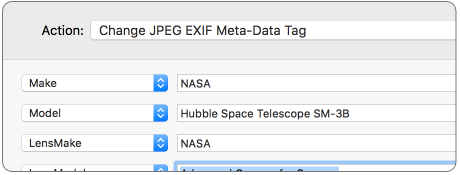
File Multi Tool 7 allows the most commonly used EXIF & IPTC meta-data tags, such as copyright &
owner
information, camera & lens specifications, some exposure information and much else besides, to be directly
manipulated.
You can strip EXIF, GPS & IPTC information from a file altogether, remove only GPS and IPTC location tags or add or change individual tags.
Total File Creation & Modification Date Control
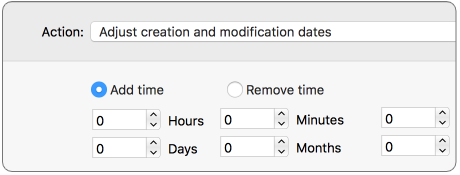
File Multi Tool 7 gives you total control over file creation and modification dates, setting them
to specific times and dates, adding or removing time or simply removing them altogether.
Using Dates Embedded in the File Name

File Multi Tool 7 can extract file date information embedded in file names and use
this information to set the various file dates. This feature is highly flexible and configurable and covers almost
any imaginable situations.
You can use our file renaming product, A Better Finder Rename,
to "massage" the file names or to inject the dates into the file name in the first place.
Using Dates Taken From Files of the Same Name in a Different Folder Hierarchy

Many image and video processing applications have a tendency of losing your files' meta-data.
As long as you keep the originals around, you can use File Multi Tool to transfer file dates from your original files to the processed files.
Incrementing Dates From a Known Start Date

In other situations, especially when dealing with scanned photos, your image files may have no creation date information at all.
You can use File Multi Tool to add this information by starting from an approximate date & time and adding a small time increment for each successive file, thus
ensuring that your photos show up in the correct order in your image management software.
Setting Mac File Flags
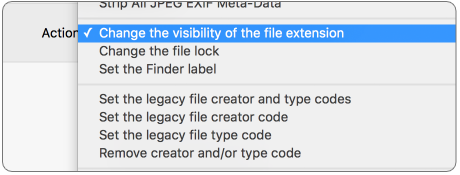
File Multi Tool supports setting all common Mac file system flags. You can set whether or not
file extensions appear in the Finder, batch lock or unlock files, set or remove legacy creation & type
codes, restart the Finder in a special mode that shows invisible files, batch set
Finder labels and force Finder updates.
Showing & Deleting Invisible Files
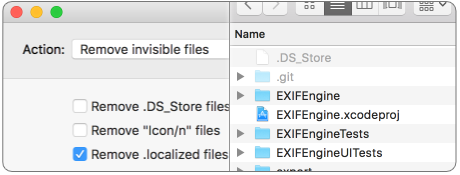
File Multi Tool can delete invisible files, such as .DS_Store, that can lead to problems when
delivering files to
non-Mac systems and play havoc with Unix tools such as version control and archiving tools.
On top of this File Multi Tool has a special "Show Invisible Files" feature hidden in
the "Tools" menu that
switches the Finder to a special mode in which invisible files become visible.
Usage Scenarios
File Multi Tool has been used by professional photographers, web site designers and developers and
many other creative professionals who deal with large file collections for close to two decades now.
Correcting For Camera Clock & Time Zone Errors
Whether you forgot to reset the timezone of your camera while traveling, or
are using
multiple cameras but
have forgotten to sync their clocks, the resulting time discrepancies can wreak havoc with your file
collections.
File Multi Tool 7 offers a simple way of adding or removing time intervals to entire photo
collections in one fell swoop.
Correcting Sorting in the Finder
The Finder uses the file creation or modification dates to sort files but cannot sort by shooting date.
Use File Multi Tool 7 to copy the shooting date to the creation date to get files to sort
intuitively.
Importing Scanned Photos without EXIF Information into Photos
Scanners don't know when a picture was taken, but you can arrange your photos to be scanned in sequence. You can use the Advanced Time
Manipulation action to set the EXIF DateTimeOriginal timestamp and add short time interval to each photo to get them to sort correctly
in Photos.
Copying File Dates from Originals to Processed Files
Many image manipulation packages don't correctly preserve your file dates. Use the Advanced Time Manipulation action
to copy those file dates from your backup of the original files to the new processed files.
Use Dates Embedded in the File Name to set Dates
Some image processing tools don't preserve your file dates correctly but place them in the file names.
Alternatively, you can use A Better Finder Rename to put the
dates into the file name. You can then use File Multi Tool to extract the dates from the file names
and re-apply them.
Removing Camera, Lens & Exposure Information
Many professional photographers do not want to send meta-data about their equipment and exposure information
with their files and use File Multi Tool to remove this information before delivering files to
clients or uploading them to stockphoto sites.
Adding Copyright or Anonymizing Image & Video Files
While some photographers prefer anoniziming JPEG files before delivery, others want to add copyright
information before delivering their files or sharing them on stockphoto sites. File Multi Tool 7
supports both and makes them equally convenient.
Standardizing File Dates & Flags
A bunch of files with different creation and modification dates, inconsistent file extension settings and
Finder labels look messy and unprofessional. Use File Multi Tool to standardize file creation and
modification dates, file extension hiding and Finder labels for a cleaner look.
Features
File Multi Tool 7 is designed with the care and attention to detail that Mac users have grown to
expect. Originally released on Mac OS 8, it has been rewritten from scratch several times to take advantage
of
all the latest Mac technologies and feedback from our loyal users to bring you the best in class user
experience.
Simple, Powerful, Intuitive
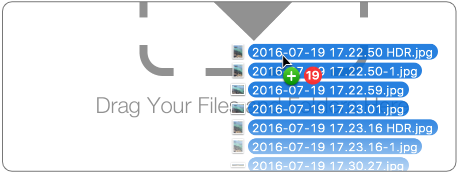
File Multi Tool 7 offers a best-in class user experience with convenient drag & drop adding of
files, context sensitive file information, Finder context-menu integration and the attention to detail that
Mac users are accustomed to.
File Content & Meta-Data Preview
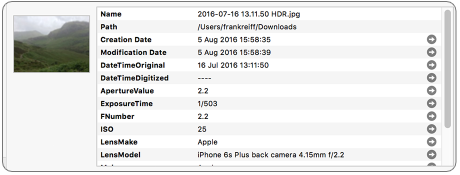
The new Preview Pane in File Multi Tool 7 allows you to peek inside your files and
delve into its meta-data, making it much easier to work with meta-data tags and providing additional
confidence in your settings.
Download the Free Trial
Don't just take our word for it.
Make up your own mind and download the free trial today.
Download Version 7.48 for Intel &
Apple Silicon Macs running macOS 10.11 or later. macOS 11 Big Sur compatible.
Download Version 6.25 for Intel Macs running OS 10.10 to 10.15.
Download Version 6.11 for Intel Macs running macOS 10.7 to 10.9.
Single User, Family, Small Business, Business and Enterprise licenses, as well as discounted and forever
upgrades are exclusively available in our web store.