Applies to macOS Ventura through macOS 27
The short answer: every file a production sound recorder writes already knows what it is. The
bext and iXML metadata chunks inside a Broadcast Wave file carry the project, scene, take, sound
roll, the circled-take flag, the track and microphone names, and the exact origination date and
time. Only the filename is useless: A001_001.WAV tells an editor nothing. On a Mac you can turn
that embedded metadata into proper filenames for free with the command-line
ExifTool, or in batches with a live preview using a dedicated renaming
tool. Nothing about the job requires re-recording, re-exporting or touching the audio itself.
A disclosure: I’m the developer of A Better Finder Rename, a paid batch renamer that reads Broadcast Wave metadata natively. The free route is covered honestly first.
Three boundary checks before we start:
- You want to rename the files from the metadata inside them → this guide.
- You want to view or fix the metadata itself (a wrong scene name, a missing project) → that’s
a metadata editor’s job, not a renamer’s. Sound Devices’ free
Wave Agent batch-edits BWF metadata, and the
free BWF MetaEdit embeds and repairs
bextchunks. - Your files aren’t audio, or the job is general-purpose (dates, numbering, find & replace) → start with the broader guide to batch renaming files on a Mac.
What your recorder writes into every take
A Broadcast Wave file (BWF, sometimes BWAV) is a standard WAV file with extra professional metadata chunks. Two of them matter for renaming:
bextis the original EBU Broadcast Wave extension: a description, the originator (the recorder’s make and serial number), the origination date and time of the recording, and a timecode reference. Every field recorder and most DAWs write it.- iXML is the richer XML block added later for film and broadcast workflows. It carries
Project, Scene, Take, Tape (the Sound Roll), a free-text Note, the
circled (keeper) take flag, the as-recorded original filename, and per-channel track
names: the mic labels your mixer typed on set (
MixL,Boom,Lav1).
Recorders from Sound Devices, Zoom’s F-series, Tascam, Zaxcom and Aaton all write these chunks by
default. So a file named A001_001.WAV typically contains something like:
Project: North Shore   Scene: 24B   Take: 3   Sound Roll: A001
Tracks: MixL, MixR, Boom, Lav1     Circled: TRUE
Originated: 2026-08-06 14:32:11    Recorder: Sound Devices MixPre-10 II
Everything an assistant editor needs for a filename like
North Shore - 24B - Take 3 - A001.WAV is already in the file. The rest of this guide is about
getting it out.
To see what’s actually inside one of your files, ExifTool prints every field:
exiftool -a -G1 -s take.wav
The iXML fields appear under ExifTool’s own names (BwfxmlScene, BwfxmlTake, BwfxmlTape,
BwfxmlProject), the bext fields under RIFF (Originator, DateTimeOriginal).
The free route: ExifTool
ExifTool doesn’t just read metadata; it can rename files from it. A dry run first, using
-TestName, which prints the new names without touching anything:
# dry run: show what would happen, rename nothing
exiftool '-TestName<${BwfxmlProject} - ${BwfxmlScene} - Take ${BwfxmlTake}.%le' -ext wav .

# the same, for real
exiftool '-FileName<${BwfxmlProject} - ${BwfxmlScene} - Take ${BwfxmlTake}.%le' -ext wav .
Or by the recording’s own origination date, with %%-c appending a copy number when two takes
would collide:
exiftool '-FileName<RIFF:DateTimeOriginal' -d '%Y-%m-%d_%H%M%S%%-c.%%le' -ext wav .
This works, it’s free, and for a one-off folder it may be all you need. The caveats are the usual command-line ones:
- No preview.
-TestNameis a separate manual step, and scrolling hundreds of terminal lines for the one file with a blank scene field is not the same as seeing it flagged. - Missing fields bite silently. Files without the tag are skipped with a terse warning; fields that are present but empty produce names like ` - Take 3.wav`, and you find out afterwards.
- The tag names are ExifTool’s, not the industry’s. Nothing tells you that Sound Roll is
BwfxmlTape; you discover the vocabulary by dumping files and reading. - One mistake renames the whole folder. There is no undo; the standard advice is to work on a copy.
The batch tool: A Better Finder Rename
A Better Finder Rename has renamed files from embedded metadata (EXIF capture dates, ID3 music tags) for decades; version 12.32 added dedicated Broadcast Wave tokens on top of the same engine, and 12.33 adds the start timecode. Drop your WAV files or a whole folder of dailies on the window, choose Rename using tag(s) from the Tags action category, and build the filename from tokens:
| Token | Meaning |
|---|---|
<BWFScene> |
Scene / slate |
<BWFTake> |
Take number |
<BWFTape> |
Sound Roll / Tape |
<BWFProject> |
Project name |
<BWFNote> |
The free-text note field |
<BWFCircled> |
The circled (“keeper”) take flag |
<BWFTrackNames> |
Track / microphone names from iXML, in channel order |
<BWFOriginator> |
Recorder make and serial from bext |
<BWFOriginalFilename> |
The as-recorded original filename |
<BWFOriginalFilenameNoExtension> |
The same, without its extension (for building it into a longer name) |
<BWFTimecode> |
The bext start timecode as HH-MM-SS-FF; <BWFTimecode_HH_MM_SS_FF> and <BWFTimecode_HHMMSSFF> give underscore and compact variants |
<BWFTimecodeRate> <BWFTimecodeFlag> |
The timecode frame rate (e.g. 23.976) and the NDF/DF flag |
<AudioBitDepth> <AudioChannels> <AudioFormat> |
Technical values, e.g. 24, 4, Microsoft PCM (these also work for AIFF and QuickTime/MP4 files) |
The pattern is ordinary text with tokens dropped in wherever the metadata should go:
| Original name | A001_001.WAV |
| In the file | Project North Shore · Scene 24B · Take 3 · Sound Roll A001 |
| Your pattern | <BWFProject> - <BWFScene> - Take <BWFTake> - <BWFTape> |
| New name | North Shore - 24B - Take 3 - A001.WAV |
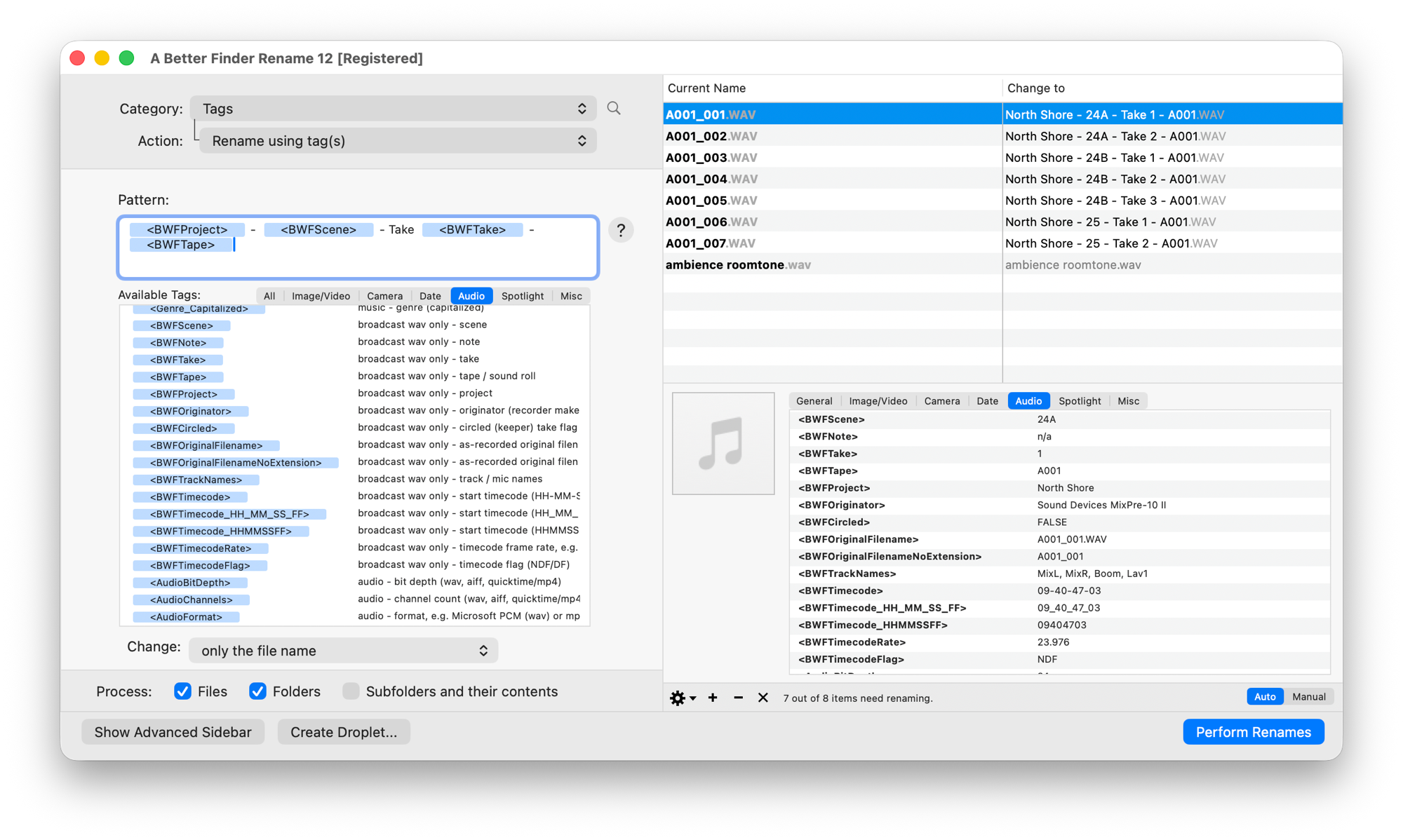
One pass over a day of dailies: the pattern on the left, every resolved name in the preview before anything is renamed. The metadata-free ambience file is left untouched, and the info pane shows exactly what the selected take carries.
The differences from the ExifTool route are exactly the pain points above:
- A live preview of every name. The right-hand list always shows the new names before anything is renamed. Change the pattern, watch the names update.
- Missing metadata can’t produce a broken name. When a file doesn’t carry the metadata a token needs, A Better Finder Rename leaves that file’s name completely unchanged and shows it greyed out in the preview, rather than writing a half-empty name.
- It composes with everything else the app does. Add sequence numbers, force upper or lower case, find & replace, or chain several steps in one pass; the metadata tokens are ordinary building blocks. Name collisions are flagged before you commit.
- The vocabulary is on screen. The tokens live under the tag picker’s Audio tab, described in plain language; no dumping files to learn that Sound Roll means Tape.
- So are the values. Select a file and the info pane shows the metadata it actually carries, so you can check a take’s scene, roll and track names before you build the pattern, without reaching for a separate metadata viewer.
A few patterns from real workflows:
- Sort the keepers first.
<BWFCircled>folds the circled-take flag into the name, so the selects are obvious in the Finder before anything reaches the timeline. - Delivery conventions in seconds.
<BWFTape>_<BWFScene>_<BWFTake>rebuilds aRoll_Scene_Takehouse convention across a day of dailies in one pass. - Mic names in the filename.
<BWFTrackNames>joins the track names in channel order:24B T3 - MixL, MixR, Boom, Lav1.WAVtells a sound editor what’s on the file without opening it. - Date-based renaming uses the recording’s own date. The
bextorigination date now feeds every date-based renaming feature, so<Year>-<Month>-<Day>resolves to when the take was actually recorded, not when the files were copied off the card. - Start timecode in the name.
<BWFTimecode>turns thebexttimecode reference into09-40-47-03, so a sound editor can see at a glance where a take sits on the timeline; add<BWFTimecodeRate>when a shoot mixes frame rates. - Keep the chain of custody. Append
<BWFOriginalFilenameNoExtension>(or keep the original name and only prepend metadata) so every renamed file still references its as-recorded name without ending up with two extensions.
One thing it deliberately does not do: A Better Finder Rename only changes filenames. The audio
samples, the bext and iXML chunks, and the timecode reference are left byte-for-byte untouched;
a renamer that rewrote your metadata would be a liability. (If you need the metadata itself
changed, that’s Wave Agent’s job; the two
tools complement each other.)
It’s version 12, US$29.95 / €29.95 as a one-time purchase, with a free trial that renames up to ten files at a time. The Broadcast Wave tokens need version 12.32 or later, the timecode tokens version 12.33; updates within version 12 are free.
The tricky cases
- Post-produced files with hollow iXML. Files that have passed through an audio editor
sometimes carry an iXML chunk whose Scene and Take fields are empty, with the real values packed
into the
bextdescription string (sSCENE=24B.sTAKE=022…). The tokens read the proper fields; a file like this previews as unchanged. Check one file from each source in the info pane before renaming a thousand, and fix the metadata first if it’s genuinely broken. - Mono stems and polyphonic files. A polyphonic WAV renames as one file. Recorders that write
one mono file per track usually put the same Scene/Take in each stem, so a pure
<BWFScene>_<BWFTake>pattern would collide; keep the original name’s channel suffix in the pattern, or let the collision warning catch it. - Repeating scene/take across rolls. Scene 24B Take 1 can exist on two sound rolls. Include
<BWFTape>in the pattern and the names stay unique across the whole shoot. - RF64 and multichannel files. Large-format and multichannel Broadcast Wave files carry the same metadata and rename like any other file; channel count and interleaving are irrelevant to a rename.
Common pitfalls
- Renaming away the only reference to the original name. Dailies software, sound reports and
EDLs may reference the as-recorded filename. The file itself keeps it in iXML (and
<BWFOriginalFilename>can put it back), but the safe convention is to keep a reference in the new name from the start. - Expecting the filename to update the metadata. Renaming changes what the Finder shows; Pro Tools and Resolve read Scene and Take from the metadata, which is untouched. That’s the correct behaviour, but worth knowing: fixing a wrong scene name in the filename does not fix it in the file.
- Renaming the card instead of a copy. Standard production discipline applies: offload first, verify, then rename the copies. A live preview catches mistakes before they commit, but original cards are sacred.
FAQ
What is a Broadcast Wave (BWF / BWAV) file? A standard WAV file with additional professional
metadata chunks: bext (the EBU Broadcast Wave extension) and usually iXML, carrying fields like
Scene, Take, Project, Sound Roll, track names, the origination date and a timecode reference. Most
production sound recorders write BWF by default, which is why the files play everywhere ordinary
WAVs do.
What’s the difference between bext and iXML? bext is the original, compact extension:
description, originator, origination date/time, timecode reference. iXML is the richer XML block
added for film workflows: Scene, Take, Project, Tape/Sound Roll, circled flags, track names and
more. A Better Finder Rename reads both.
Which recorders does this work with? Any recorder or software that writes standard bext and
iXML chunks: Sound Devices (MixPre, 8-series and earlier), Zoom F-series, Tascam, Zaxcom, Aaton
Cantar, and most DAW bounces that include BWF metadata. The renaming reads the file, not the
brand.
Is Sound Roll supported? Yes. Sound Roll is stored in the iXML Tape field; use the
<BWFTape> token.
Does renaming change my audio or the embedded metadata? No. Renaming changes the file’s name
in the file system and nothing else: samples, bext, iXML and timecode are byte-for-byte
identical afterwards.
Can I put the start timecode in the filename? Yes, since version 12.33. The bext timecode
reference is stored as a raw sample count; <BWFTimecode> converts it to SMPTE timecode in
filename-safe HH-MM-SS-FF form (with underscore and compact variants), including correct
drop-frame handling for 29.97 and 59.94 fps. <BWFTimecodeRate> and <BWFTimecodeFlag> add the
frame rate and the NDF/DF flag.
I know this workflow as “renaming by Scene and Take”, not as “iXML”. Is this the same thing? Yes. Scene and Take live in the iXML chunk; if you rename location or production sound by Scene and Take, reading iXML is exactly what the tools in this guide do.
Can I combine the metadata with numbering, case changes or find & replace? Yes; that’s the point of doing it in a batch renamer. Metadata tokens, sequence numbers, case changes and find & replace combine in one multi-step pass, with one preview for the combined result.
Frank Reiff is the developer of A Better Finder Rename, a Mac batch file renamer in continuous development since 1996. Start with the wider guide to batch renaming files on a Mac, or get in touch with a renaming problem this guide doesn’t cover.