The short answer: deep work is a long, undistracted block spent on one cognitively demanding task. To protect it on a Mac you need three things: a way to silence interruptions (macOS Focus modes do this for free), a ritual that starts the block with a clear intention, and a timer that keeps the block honest. You can assemble this from built-in tools today. A dedicated app helps when you want the ritual, the distraction handling and the record all in one place.
A disclosure up front: I’m the developer of Vitamin-R, a paid Mac focus app, so expect this to end with a recommendation. The first three quarters are written to be useful even if you never buy anything.
What deep work is (and isn’t)
The term, popularised by Cal Newport, means professional activity performed in a state of distraction-free concentration that pushes your cognitive abilities to their limit. The opposite is “shallow work”: email, chat, logistics, the busywork that fills a day without moving anything important.
Two features distinguish deep work from ordinary focus. The blocks are longer (often 60 to 90 minutes rather than a 25-minute Pomodoro), and the bar for zero interruption is higher, because the value comes from reaching a state that takes time to enter and is expensive to re-enter after a break.
What it takes to protect a deep-work block
- Ruthless interruption blocking. One notification can cost far more than the second it takes to read, because getting back into flow is slow. Silence everything for the block.
- A starting ritual with a clear objective. Deep work rewards knowing exactly what you are trying to produce before you begin, not deciding as you go.
- A block long enough to reach depth, bounded enough to be sustainable. Open-ended “work until done” burns you out; a defined block you can commit to protects the practice.
- A record. Tracking how much genuine deep work you did is how the habit compounds. What gets measured gets protected.
The free and built-in ways (try these first)
- macOS Focus modes are the single most important free tool here. Create a “Deep Work” Focus that silences notifications and, on recent macOS, hides distracting apps and home-screen clutter. This alone removes most interruptions.
- The Clock app timer bounds the block. Set 90 minutes, write your one objective on paper, and you have a legitimate deep-work session for free.
- Website and app blockers (including free options) hold the line against the reflexive tab you open without thinking.
For a lot of people, a Deep Work Focus mode plus a long timer is genuinely all they need. If that describes you, don’t buy anything.
Dedicated deep-work apps
The case for a dedicated app is convenience and follow-through: the ritual, the distraction handling, the soundscape and the record in one place, so protecting deep work is not itself a chore. Several Mac focus apps suit longer blocks; pricing varies, so check current terms.
Vitamin-R is the one I make, and for deep work it offers:
- Flexible block lengths, so you are not locked to a 25-minute Pomodoro; set the 60 to 90-minute blocks deep work wants.
- An objective prompt that turns “start the block” into “start the block on this specific thing”, which is the deep-work ritual made concrete.
- A place to capture intruding thoughts without leaving the block: the built-in Now & Later board parks a stray thought in a few keystrokes, and for heavier capture a dedicated tool like Burst Notes is a more sophisticated companion.
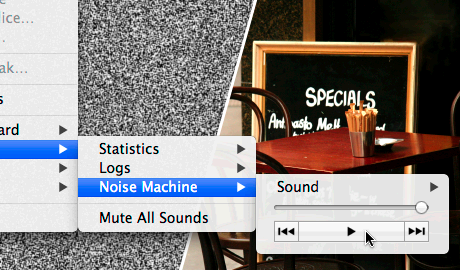
- Focus soundscapes and a built-in noise machine to mask a noisy room or fill a silent one, which many people find helps them reach depth faster.
- A log book and analytics that show how much real deep work you are doing and when, so the habit compounds instead of drifting.
- Deep customization, because a tool you spend 90-minute blocks inside needs to fit you; you can tailor the interface, the notifications and the workflow so nothing nags at you mid-flow.
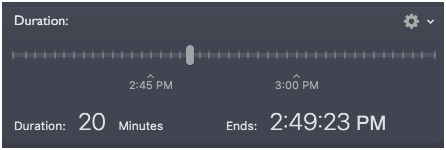
Vitamin-R is a one-time purchase ($29.95) with a free trial, and complements task managers such as OmniFocus and Things rather than replacing them.
Common pitfalls
- Blocks that are too short. A 25-minute Pomodoro is great for chipping at tasks but often too short to reach true depth. Give deep work room.
- Half-hearted interruption blocking. “I’ll just leave Slack open quietly” defeats the purpose. Silence it fully.
- No objective. A long block with a vague goal drifts into shallow work. Name the output first.
- Never reviewing. If you don’t track it, deep work quietly gets crowded out by the urgent.
FAQ
What is the best timer length for deep work? Most people aim for 60 to 90 minutes of uninterrupted focus, followed by a real break. Start at 60 and extend as your capacity grows.
How is deep work different from the Pomodoro Technique? Pomodoro uses short 25-minute boxes and suits chipping away at tasks or getting started. Deep work uses longer blocks to reach a state of deep concentration. Both are forms of time boxing; they just use different durations.
Can I do deep work on a Mac for free? Yes. A “Deep Work” Focus mode plus the built-in Clock timer and a written objective is a complete, free setup. A dedicated app adds the ritual, soundscapes and tracking in one place.
Does this help with ADHD? Some of it does, though very long blocks can be harder to sustain. My focus apps for ADHD guide covers what tends to help.
Written by Frank Reiff, developer of Vitamin-R, a focus and time boxing app for the Mac from publicspace.net. See also my guides to time boxing on a Mac and focus apps for ADHD.