The short answer: time boxing means giving a task a fixed slot of time and a single, clear objective, then working on nothing else until the time is up. You can start today with the Clock app already on your Mac and a sticky note for your objective. If you find the habit sticks and you want the method to carry more of the load, a dedicated time boxing app adds the parts a bare timer cannot: defining the objective, capturing the distractions that pull you away, and a record of what you actually got done.
A disclosure up front: I’m the developer of Vitamin-R, a paid Mac focus and time boxing app I’ve been refining for over fifteen years. You’d be right to expect this article to end by recommending it. So I’ve tried to make the first three quarters genuinely useful whether or not you ever buy anything, and to be honest about when the free options are all you need.
What time boxing actually is
Time boxing is deceptively simple. Instead of working on a task “until it’s done” (an open-ended commitment your brain quietly dreads), you box it: “I will work only on drafting the introduction, for the next 25 minutes, and nothing else.” When the box ends, you stop, take a short break, and start a new box.
Two things do the work here. The fixed duration makes starting easier, because 25 minutes is not frightening the way “write the report” is. The single objective removes the constant micro-decisions about what to do next, which is where a surprising amount of focus leaks away.
The Pomodoro Technique is the best-known flavour of time boxing: fixed 25-minute boxes with 5-minute breaks. Time boxing is the broader idea. You can run 15-minute boxes, 50-minute boxes, or vary them by task and energy. Pomodoro is one preset; time boxing is the whole dial.
The free and built-in ways (try these first)
You do not need to buy anything to find out whether time boxing works for you. Start here.
A plain timer
Every Mac has the Clock app with a Timer tab, and you can start a countdown from Siri or the menu bar in seconds. Pair it with a single line written on paper or in a note (“box: fix the login bug”) and you have done real time boxing. For many people, honestly, this is enough. If a free timer plus a sticky note gets you focused, keep the money.
The limits show up over days, not minutes. A plain timer does not ask you what your objective is, so it is easy to start a box vaguely. It does nothing when a distracting thought arrives mid-box. And it keeps no record, so you never learn which times of day or which task sizes actually work for you.
Apple’s Focus modes and Screen Time
macOS Focus modes (and Screen Time) can silence notifications and hide distracting apps while you work. These are worth setting up regardless of which timer you use, because they remove a whole class of interruptions. But they are not time boxing: there is no objective, no box, and no review. Think of them as the quiet room, not the method.
Free and freemium Pomodoro apps
There are many free or freemium Pomodoro timers for the Mac, from tiny menu-bar countdowns to web apps you leave open in a tab. Be Focused is a well-known example with a free tier. These add niceties over the Clock app (repeating boxes, a running count, basic stats) and cost nothing to try.
If you go this route, you will get further than a bare timer. What most free timers still leave to you is the method: they count down, but they do not help you set a good objective, they do not catch the thought that yanks you out of the box, and their record of your work tends to be thin.
Dedicated time boxing apps (built for exactly this)
When time boxing has become a habit you rely on, the friction moves. It is no longer “how do I run a countdown” but “how do I start the box cleanly, stay in it, and learn from it.” That is what dedicated Mac focus apps are built to remove. Several are well regarded, including Be Focused, Session and Focus; pricing models vary from one-time to subscription, so it is worth checking what each currently charges.
Vitamin-R is the one I make, and its design bet is that time boxing is a method, not a timer. So alongside the countdown it gives you:
-
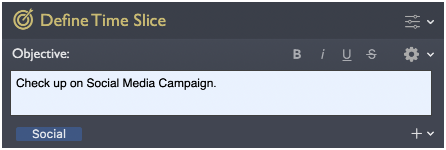
An objective prompt at the start of every box, so you commit to one clear, reachable thing before the clock starts, instead of drifting.
- A place to capture intruding thoughts. When “I must email Sarah” pops up mid-box (it always does), Vitamin-R’s built-in Now & Later board lets you park it in a few keystrokes and stay put, rather than switching tasks and losing your thread. For heavier note-taking, or thoughts you want to keep well beyond the current box, a dedicated quick-capture tool like Burst Notes is a more sophisticated companion.
- Flexible durations, including a classic Pomodoro profile if you want the standard 25/5, or your own rhythm if you don’t.
- Deep customization, because you live in it. A time boxing app is not something you open once or twice; you work alongside it for whole sessions, so small frictions turn into real irritations fast. Vitamin-R lets you tailor almost everything: which interface elements you see and how they look, how you are notified and kept on track, and the shape of the workflow itself.
- Focus soundscapes and a built-in noise machine to mask an open-plan office or a quiet room that lacks energy.
-
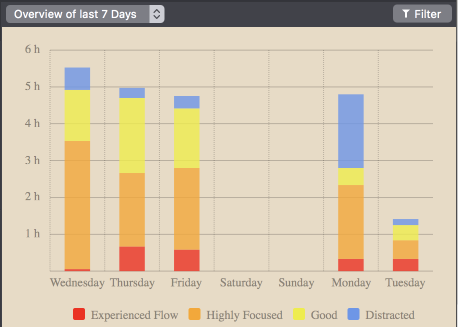
A log book and analytics that turn effort into visible progress and, over time, show you which days and hours you actually focus best.
Vitamin-R is a one-time purchase ($29.95) with a free trial, and it is popular with people who have ADHD, who often find the explicit structure and stay-on-task prompts especially helpful. It complements task managers such as OmniFocus and Things rather than replacing them.
Which approach for whom
- You want to try the idea today: the Clock app plus a written objective. Free, five seconds to set up.
- You like the habit and want a nicer loop: a free or freemium Pomodoro app such as Be Focused.
- You rely on focus for your living and want the method to carry the load: a dedicated app such as Vitamin-R, where the objective, distraction capture and analytics matter as much as the timer.
Notice the progression. The right tool depends on how central focused work is to your day, not on which app has the longest feature list.
Common pitfalls, whatever tool you use
- Boxing without an objective. A countdown with no clear goal is just a timer. Name the one thing before you start.
- Boxes that are too big. If 50 minutes feels daunting, that is your brain telling you the box is too large. Shrink it until starting is easy; you can always run another.
- Task switching mid-box. The whole point is to not act on the intruding thought. Write it down, keep going, deal with it in the break.
- Skipping breaks. Breaks are not slacking; they are when the diffuse, pattern-matching part of your mind catches up. Box the break too.
- No review. If you never look back at what worked, you cannot improve. This is the single biggest thing a plain timer cannot give you.
FAQ
Is time boxing the same as the Pomodoro Technique? Pomodoro is a specific form of time boxing: fixed 25-minute boxes with 5-minute breaks. Time boxing is the general method, and it lets you vary the durations to suit the task and your energy.
What is the best box length? Start around 15 to 25 minutes. Short enough that starting is never frightening, long enough to make real progress. Adjust from there; the best length is the one you will actually begin.
Is there a free way to do time boxing on a Mac? Yes. The built-in Clock app plus a written objective is genuine time boxing at no cost. Free Pomodoro apps add repeating boxes and basic stats. Dedicated apps add the method around the timer.
Does time boxing help with ADHD? Many people with ADHD report that time boxing’s explicit structure, short commitments and stay-on-task prompts help them start and stay on difficult work. It was not designed specifically for ADHD, but the fit is a common reason people reach for a dedicated app rather than a bare timer. See my guide to focus apps for ADHD on a Mac for more.
Do I still need a to-do app? Yes, and they work together. A to-do manager decides what to work on; a time boxing app governs how you work on it. Vitamin-R integrates with OmniFocus and Things for exactly this reason.
Written by Frank Reiff, developer of Vitamin-R, a focus and time boxing app for the Mac from publicspace.net, which has made Mac software since 1996. See also my guides to focus apps for ADHD and deep work on a Mac.