The short answer: no app fixes ADHD, but the right one can carry some of the load your executive function struggles with: starting, staying on one thing, and remembering the thought you had ten seconds ago. What helps most is a tool that makes you name a small, concrete objective, keeps you gently on track, gives you somewhere to dump intruding thoughts, and shows you quick progress so starting feels less awful next time.
A disclosure, and a caveat. I’m the developer of Vitamin-R, a paid Mac focus app, so I have skin in this game. I’m also not a clinician, and nothing here is medical advice. Vitamin-R was never designed specifically for ADHD; I’ve simply heard from a lot of people with ADHD over fifteen years about what does and doesn’t help them, and this guide reflects that.
Why focus is hard with ADHD (in plain terms)
Most focus advice quietly assumes an executive-function system that ADHD makes unreliable. Starting a boring-but-important task, holding your intention against a more interesting distraction, and keeping working memory intact through an interruption: these are exactly the things that are harder. So a tool that just counts down 25 minutes often is not enough. The useful ones externalise the parts your brain is not reliably doing on its own.
That is the lens for everything below: not “which app has the most features”, but “which app does the executive-function work for me”.
What actually helps (feature by feature)
- A forced, tiny objective. Being made to type one concrete thing (“reply to the Henderson email”) before the clock starts beats a vague intention every time. Small and specific lowers the activation energy.
- Externalising working memory. When a thought intrudes (“I need to book the dentist”), you need to offload it instantly, or it either derails you or is lost. Capturing it in a few keystrokes is worth more than most flashy features.
- Immediate, visible progress. ADHD brains are wired for now, not later. Seeing a session completed, a streak, or today’s focused time turns effort into a reward you can feel today.
- Gentle, insistent nudges. Notifications that pull you back when you drift, without being so harsh you turn them off, matter more than they sound.
- Low friction. If starting the app is itself a chore, you won’t. Global hotkeys and a keyboard-first design remove one more excuse.
The free and built-in ways (try these first)
Do not spend money to find out what works for your brain.
- macOS Focus modes and Screen Time silence notifications and can hide the apps that eat your attention. Set these up regardless of anything else; removing interruptions is half the battle.
- The built-in Clock timer plus a written objective is real structure at zero cost. Pair it with a paper pad for dumping stray thoughts.
- Free and freemium focus apps (for example Be Focused’s free tier, or any of the many web-based Pomodoro timers) add repeating sessions and a bit of tracking without a purchase.
If a free timer plus Focus mode gets you working, that is a genuine win. Keep it.
Dedicated focus apps worth paying for
The reason people with ADHD often graduate to a paid app is that the free ones count down but do not do the executive-function work. Several dedicated Mac apps are well regarded; pricing models vary, so check what each charges now.
Vitamin-R is mine, and the reasons people with ADHD tend to reach for it map closely to the list above:
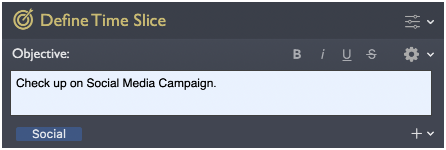
- It makes you set a small, specific objective at the start of every focus block, so you are not relying on willpower to stay pointed at the right thing.
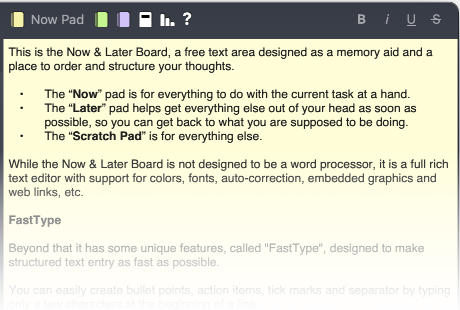
- Its built-in Now & Later board lets you park an intruding thought in a few keystrokes and keep going. For heavier capture, a dedicated tool like Burst Notes is a more sophisticated companion for getting things out of your head fast.
- It gives immediate feedback and a log book, so progress is visible today and you can see which times of day you actually focus best.
- Its notifications and stay-on-task prompts are highly customizable, which matters because a focus app is one you live inside for whole sessions. Small irritations become deal-breakers fast, so being able to tune exactly how you are nudged is not a luxury.
Vitamin-R is a one-time purchase ($29.95) with a free trial, and it complements task managers such as OmniFocus and Things rather than replacing them. It is not a treatment; it is scaffolding.
Common pitfalls
- Boxes that are too big. If starting feels impossible, the block is too long. Shrink it until beginning is easy.
- Ignoring the capture step. The intruding thought will come. If you don’t have somewhere to put it in a few keystrokes, it wins.
- Turning off the nudges. If notifications are annoying, tune them rather than disabling them entirely, or you lose the one thing pulling you back.
FAQ
Is there an ADHD-specific focus app for Mac? Most “ADHD focus apps” are general focus apps that happen to fit ADHD well because of how they handle objectives, distraction capture and feedback. Vitamin-R is one example that many people with ADHD favour, though it was not built specifically for ADHD.
Does time boxing help with ADHD? Many people report that it does: short, concrete commitments lower the activation energy for starting, and a fixed end makes staying easier. See my guide to time boxing on a Mac for how to start.
Is a paid app worth it over a free timer? Only if the free timer is not enough. If you keep losing the thread, forgetting stray thoughts, or never starting, the executive-function help in a dedicated app is what you are paying for.
Is this medical advice? No. This is a software developer’s practical experience, not clinical guidance. For diagnosis and treatment, talk to a qualified professional.
Written by Frank Reiff, developer of Vitamin-R, a focus app for the Mac from publicspace.net. See also my guides to time boxing on a Mac and deep work on a Mac.