Version 4.26
18th June 2026
The new version fixes a minor issue.
Version 4.25
8th June 2026
The new version adds a daily recap panel, a new on-boarding experience, better normalization of sounds, improved defaults and other minor improvements.
Version 4.24
2nd June 2026
The new version improves how the program interacts with the macOS Spaces feature.
Version 4.23
27th May 2026
The new version adds a new auto-forward feature to the basic workflow of the tool.
Version 4.22
5th May 2026
The new version adds improved command window with recency and frequency heuristics.
Version 4.21
28th October 2025
The new version fixes the toolbar on macOS Tahoe.
Version 4.20
12th September 2025
The new version delivers macOS 26 Tahoe compatibility.
Version 4.19
6th November 2024
The new version makes a few changes to preempt potential certificate problems come January 2025.
Version 4.18
20th March 2024
The new version fixes a minor incompatibility with macOS Sonoma.
Version 4.17
22nd February 2024
The new version fixes a minor log editing bug.
Version 4.16
18th January 2023
The new version fixes a rare double logging bug.
Version 4.15
22nd September 2022
The new version fixes a minor bug affecting the objective replacement tag in the notifications.
Version 4.13/4
8th August 2022
The new version introduces a new way of managing tasks inside, or even outside, of the app through Objective Parsing.
This allows you to define multiple tasks in advance by writing them down in a simple: {textual description, number of minutes
, @tags} format and parsing that text to set the objective, duration and tags.
You can do this in any plain text editor, word processor, note taking app or web todo list manager, including the Later Pad inside of Vitamin-R.
For full details watch the new Task Management in Vitamin-R: Parse Clipboard YouTube video.
Version 4.12
29th June 2022
The new version add the option to always skip breaks.
Version 4.11
8th June 2022
The new version adds the option to always skip logging.
Version 4.10
11th May 2022
The new version fixes a minor bug with the Things todo list manager integration.
Version 4.09
14th April 2022
The new version fixes a bug affecting the break duration control.
Version 4.08
2nd February 2022
The new version links to the new Deep Dive Tutorial Video.
Version 4.07
15th December 2021
The new version refines the window resizing behaviour.
Version 4.06
7th December 2021
The new version provides keyboard shortcuts to rate your concentration level directly from the keyboard.
Version 4.05
30th November 2021
The new version by default waits 2s before focusing the objective field in the Rate Time Slice screen to avoid
accidental overwriting. This behaviour can be disabled in the command window or the objective field options.
Version 4.04
25th November 2021
The new version improves support for custom pad colors.
Version 4.03
19th November 2021
The new version fixes window positioning problem at startup.
Version 4.02
17th November 2021
The new release fixes an issue with the new manual log entry addition feature.
Version 4.01
10th November 2021
The new release fixes three post-release issues:
- log files that are synced via Dropbox now update correctly
- the end date (that is no longer supported) is no longer exported to CSV
- sluggish window resizing is fixed
Version 4.00 final
3rd November 2021
Version 4 is a major new release adding the keyboard-centric command window,
a new (optional) minimalist interface, log editing, manual log entry, support for longer time slices, a return of the dock-less mode, and a user interface refresh.
Version 4.00 beta 8
26th October 2021
The new version fixes all known bugs.
Version 4.00 beta 7
12th October 2021
The new version:
- correctly displays the now & later board keyboard shortcut keys in the command window
- adds a "Start With Timed Break" command
- correctly displays the text color in the log book editor
- adds a "Read Objective Alound" command
Version 4.00 beta 6
6th October 2021
The new version fixes a crashing bug in the profile setup screen.
Version 4.00 beta 5
5th October 2021
The new version brings back dock-less operation and makes improvements to the new command window.
Version 4.00 beta 4
27th September 2021
This fourth beta adds the ability to create new log entries & delete existing ones. It also improves the command window
experience when drilling back out of a sub-menu.
Version 4.00 beta 3
21st September 2021
The new beta displays shortcuts in the command window and (finally) allows logs entries to be edited.
Version 4.00 beta 2
15th September 2021
In this release, the command window shows all keyboard shortcuts in order to make it easier to learn them by heart.
A number of new keyboard shortcuts and menu items have been added to streamline everyday usage, and a few minor bugs
have been corrected.
Version 4.00 beta 1
7th September 2021
This is the first public beta of the up-coming version 4.
Version 3.29/30/31
8th, 6th, 3rd November 2021
Minor fixes to prepare for the new version 4 release.
Version 3.28
16th August 2021
This a minor maintenance update.
Version 3.27
10th August 2021
The new version fixes a minor bug.
Version 3.26
12th February 2021
This fixes a cosmetic bug with the log book pad.
Version 3.25
10th February 2021
The new version displays a more attractive preferences pane on macOS 11 Big Sur.
Version 3.24
10th December 2020
The new version resolves a screen fading issue affecting only M1 Macs.
Version 3.23
2nd December 2020
The new version resolves another M1 related problem.
Version 3.21/2
24th November 2020
The new release fixes a bug that affects only M1 Macs.
Version 3.20
30th October 2020
The new version delivers native Apple Silicon support and Big Sur compatibility.
Version 3.19
17th September 2020
The new version fixes statistics on macOS 10.11 and makes a few minor tweaks.
Version 3.18
18th June 2020
The new version modernizes the CSV output and the Things integration.
Version 3.17
3rd June 2020
The new version solves a rare timing problem that could cause Vitamin-R to start a new time slice upon waking your Macintosh from sleep.
Version 3.16
13th May 2020
The new version adds menu item and shortcuts to make it easier to start an informal break.
Version 3.15
29th April 2020
The new version now sorts tags alphabetically.
Version 3.14
18th February 2020
The new version improves the trial experience and makes some internal improvements.
Version 3.13
26th November 2019
This release optimizes some defaults settings for an improved experience.
Version 3.12
7th November 2019
This new release makes a great many under-the-hood changes to eliminate a crash affecting many users of recent Dropbox updates.
It has gone through a total of 10 private beta releases and I have worked together with a small number of affected users. The
issue now appears to have disappeared, but should you experience any crashes please contact me directly at reiff@publicspace.net.
At the same time, this version also completely re-implements the global shortcuts feature in order to make it easier to adopt
macOS 10.15 Catalina's new hardened runtime.
Version 3.11
17th October 2019
The new version is a recommended update for all users and fixes a crashing bug.
Version 3.10
4th October 2019
The new version adds full macOS 10.15 Catalina compatibility.
Version 3.09
12th June 2019
The new release enables the standard controls of the main window.
Version 3.08
14th May 2019
The new release fixes a bug affecting software update preferences.
Version 3.07
3rd April 2019
The new release brings back the screen fading visual effect with a new implementation that works properly on macOS 10.14.4.
Version 3.06
31st March 2019
The latest release fixes a crash under macOS 10.14.4.
Version 3.05
7th March 2019
The new version adds the ability to customize where the main window appears when the icon in the menu bar is clicked.
Version 3.04
19th February 2019
The new version fixes a bug that would cause links to Things tasks to fail to open.
Version 3.03
2nd January 2019
The new version prevents accidental overtyping of objective when rating a time slice.
Version 3.02
13th December 2018
The new version fixes a minor bug.
Version 3.01
19th November 2018
The new version fixes a minor bug with a control that did not work properly.
Version 3.0 final
13th November 2018
This is the biggest update of Vitamin-R to date and features a host of new and improved features.
- a completely redesigned single window user interface offering streamlined interaction with deeper customization than ever
- the new "soft break" feature that eases you into the break and allows to finish off what you were doing
- the option to lock the screen during breaks to force you to step away from your computer
- Pomodoro-style breaks with several short breaks followed by a longer break
- individualized Profiles that pre-configure the tool for your workflow and individual preferences
- clearer statistics
- new reworked log book
- faster log file handling
- integration with OmniFocus 3 and Things 3 including tag and duration import
- macOS 10.14 Mojave support
- faster keyboard based duration entry
- improved right click menu
- and much more more
Version 3.0 beta 11
23rd October 2018
This is the first release candidate for version 3.
Version 3.0 beta 10
22nd October 2018
This new beta focuses on the interactivity of the duration controls, right click menu, OmniFocus 3 integration and minor Mojave optimizations.
Version 3.0 beta 9
15th October 2018
The new beta changes the way that the time slice extension works and makes some cosmetic improvements on Mojave.
Version 3.0 beta 8
9th October 2019
The new soft break feature makes the arrival of the break less disruptive by giving you up to 30 seconds to finish what you were doing.
When the optional soft break feature is switched on, you will hear two tick sounds that announce the end of the time slice. Vitamin-R will
then wait for you to stop typing or moving your mouse for 3 consecutive seconds before starting the break. A tock sound announces the end of
the time slice. If you do not stop working, the break will be forced after 30 seconds.
The new version also makes a number of smaller improvements, especially for macOS 10.14 Mojave.
Version 3.0 beta 7
25th September 2018
The new version makes the Things, OmniFocus and Hit Box integrations Mojave-compatible.
Version 3.0 beta 6
24th September 2018
The new version fixes some Dark Mode issues on macOS 10.14 Mojave, as well as some audio issues.
Version 3.0 beta 5
17th September 2018
The new version now correctly focuses the note pads when invoked via keyboard shortcut and fixes a pomodoro style break selection bug.
Version 3.0 beta 4
10th September 2018
The new version fixes all known problems with the beta:
- fixes a bug that would affect Pomodoro-style breaks
- fixes background noise on some sounds
- continuous sounds can now be switched on correctly mid-time slice
- the main window no longer intermittently pops to the front
Version 3.0 beta 3
4th September 2018
The new version makes a number of large changes, so please let us know if we have broken anything by mistake!
- greatly improves log file handling performance by using improved caching and multi-threading
- hyperlinks in log book are now click-able
- locking the screen option is now available from "start with a break"
- global shortcut keys for note pads now work correctly
- automatic hiding can now be switched off in the states
- hopefully corrected red border on older macOS versions
- corrected a spelling
Version 3.0 beta 2
28th August 2018
The new version:
- adds support for importing tags from Things
- adds support for importing the estimated time as time slice duration and the
current context as the tag when importing tasks from OmniFocus
- adds the Command-T shortcut for selecting the tag editor
Version 3.0 beta 1
22nd August 2018
This is the first public beta of Vitamin-R 3.
Vitamin-R 3.0 for macOS with a streamlined new user interface and much more is now available for download.
Version 3 is a paid upgrade but is free if you buy now and have bought after the
1st of January 2018.
You can install version 3 side-by-side with version 2 and it comes with its own 14 day trial.
Click Here To Download
Version 2.58
13th November 2018
The new version tells users that Vitamin-R 3 is now available.
Version 2.57
22nd August 2018
The new version tells the world about version 3.0 going beta!
Version 2.56
24th July 2018
The new version contains yet more fixes for recent macOS security changes.
Version 2.55
26th June 2018
The new version fixes a problem that caused some statistics from not refreshing correctly.
Version 2.54
23th April 2018
The new version fixes a problem that could prevent statistics filtering from working correctly.
Version 2.53
29th March 2018
The new version restores compatibility with the latest version of OmniFocus.
A recent OmniFocus update made changes that caused Vitamin-R to be unable to automatically mark OF tasks as completed.
Please note that the changes may require you to update to the latest OmniFocus version. If you experience any problems please
contact support@publicspace.net with as many details as possible.
Also note that only the Pro edition of OmniFocus supports third-party scripting, so Vitamin-R cannot mark tasks as completed if you are using the OmniFocus standard edition.
Version 2.52
13th December 2017
The new version fixes a bug in the default objectives dialog.
Version 2.51
24th October 2017
The new version fixes a minor issue with the sample AppleScript file.
Version 2.50
21st September 2017
This new version further bullet-proofs the unlock code mechanism.
Version 2.49
28th June 2017
The new version is a maintenance release.
Version 2.48
22nd June 2017
The new version adds compatibility with Things 3.
Version 2.47
25th March 2017
The new release adds a hide button to the touch bar and fixes a few minor bugs.
Version 2.46
2nd March 2017
The new release fixes a problem that would prevent the preferences dialog from appearing.
Version 2.45
1st March 2017
This new version adds touch bar support for the new MacBook Pro touch bar models.
Version 2.44
6th February 2017
The new version improves keyboard navigation.
Version 2.43
17th October 2016
This version rolls back the new swipe implementation using the new macOS navigation controller.
There appear to be UI problems on El Capitan and potential crashes when people use keyboard navigation really, really fast.
I knew it was a big underlying change with plenty of risks, but I felt confident that I had tested it sufficiently and it is essential for
moving the tool forward. I guess I am not a fast enough swiper.. Sorry guys!
Version 2.42
17th October 2016
This release fixes hot key functionality that we broke during the previous release's extensive refactoring. Sorry!
Version 2.41
12th October 2016
This release features a completely re-implemented navigation through the workflow using modern macOS technologies.
After we were concentrating on other products over the summer, Vitamin-R development is now once again fully under way!
Version 2.40
26th April 2016
The new version fixes a bug that could cause the main menu not to appear properly on some systems.
Version 2.39
8th March 2016
This latest release adds the experimental ability to execute AppleScripts at certain points to facilitate the integration with other tools.
Full documentation is available in the Help Book and by using the associated ? button in the Integrations tab of the Preferences.
Version 2.38
17th February 2016
This is the first time that we ship Swift code in a production version of any of our tools.
We also make a few minor UI tweaks.
Version 2.37
2nd February 2016
This release fixes a software update vulnerability in the Sparkle framework that was exposed on the 29th of January.
Version 2.36
28th December 2015
The new version delivers minor bug fixes.
Version 2.35
24th November 2015
The new version features an improved mailing list opt-in interface and is the first to be built with our new in-house
component framework.
Version 2.33
28th October 2015
This new version fixes a crash-upon-start issue with 2.33. Sorry!
Version 2.33
28th October 2015
This new version fixes an auto-update bug on Mac OS X 10.11 El Capitan.
Version 2.32
24th September 2015
This new version is built with Xcode 7 and updates the Mac App Store receipt checking.
Version 2.31
2nd September 2015
The new version fixes a startup bug affecting some users.
Version 2.30
26th August 2015
The new version provides improved Mac OS 10.11 compatibility.
Version 2.29
6th August 2015
The new version improves the installation experience.
Version 2.28
21st July 2015
The new release allows for default time slice and break duration of up to 60 minutes
Version 2.27
7th July 2015
The new release avoids accidental termination of the program during time slices or timed breaks.
Version 2.26
16th June 2015
The new release adds wider support for speech tags in the notification system.
Version 2.25
12 May 2015
The new release adds support for the iPad version of Vitamin-R for iOS.
Version 2.24
14th April 2015
The new release delivers a number of bug fixes:
- fixes a bug that would cause negative time slice durations to be reported
- fixes a bug that could cause corrupted log files to crash the application
Version 2.23
3rd March 2015
Delivers a minor bug fix.
Version 2.22
20th January 2015
This version now analyzes the custom speech notification messages to choose an appropriate voice for English or
non-English languages.
Version 2.21
5th January 2015
The new version fixes a problem where the text to speech feature
would use international voices to speak English text.
This release requires Mac OS X 10.10 Yosemite.
Version 2.20
9th December 2014
This release
requires Mac OS X 10.10 Yosemite.
We took the unusual step of requiring the latest version of Mac OS X
so early in its life cycle because previous versions of Vitamin-R made
heavy use of custom drawing and much of its aesthetics clashed with the
new "flatter" Yosemite look & feel.
Custom drawing also comes with a cost in terms of development and
maintenance effort, effort that is often better spent on feature
development. Previous versions of Mac OS X did not offer any standard
controls that were suitable for a HUD-style application such as
Vitamin-R, but Yosemite adds its own "vibrant dark" material
and controls, which provide a more unified user interface experience, so
I am keen to adopt this as early as possible.
Users of older Mac OS X versions, can obviously still download, use
or purchase earlier versions.
- adopts new Mac OS X 10.10 vibrant dark material throughout
- re-designed Now & Later Board
- adopts Mac OS X 10.10 only technologies
- compatible with dark mode menu bar
- re-written popup-window location code for better multiple monitor
support
- new application icon
- new installer background
- new icons throughout the application
- adopted new Helvetica Neue system font
- removed BGHUDAppKit dependency
- minor bug fixes
Version 2.20 beta 2
18th November 2014
This release
requires Mac OS X 10.10 Yosemite.
In this second beta for the new Yosemite look & feel, we have
fixed a number of minor bugs introduced in the previous version.
Version 2.20 beta 1
31st October 2014
This is the first release that
requires Mac OS X 10.10 Yosemite.
We took the unusual step of requiring the latest version of Mac OS X
so early in its life cycle because previous versions of Vitamin-R made
heavy use of custom drawing and much of its aesthetics clashed with the
new "flatter" Yosemite look & feel.
Custom drawing also comes with a cost in terms of development and
maintenance effort, effort that is often better spent on feature
development. Previous versions of Mac OS X did not offer any standard
controls that were suitable for a HUD-style application such as
Vitamin-R, but Yosemite adds its own "vibrant dark" material
and controls, which provide a more unified user interface experience, so
I am keen to adopt this as early as possible.
Users of older Mac OS X versions, can obviously still download, use
or purchase earlier versions.
- adopts new Mac OS X 10.10 vibrant dark material throughout
- re-designed Now & Later Board
- adopts Mac OS X 10.10 only technologies
- compatible with dark mode menu bar
- re-written popup-window location code for better multiple monitor
support
- new application icon
- new installer background
- new icons throughout the application
- adopted new Helvetica Neue system font
- removed BGHUDAppKit dependency
- minor bug fixes
Version 2.19
13th August 2014
This release fixes:
- a cosmetic bug where on some Macs a random character would be
displayed after some button titles
- a potential international date formatting bug
Version 2.18
5th August 2014
This release fixes a sorting bug in the Log Book.
Version 2.17
31st July 2014
This release fixes a minor menu bug.
Version 2.16
30th July 2014
This release fixes a Mavericks bug that could make Vitamin-R's menu
bar disappear.
Version 2.15
29th July 2014
This new version requires
Mac OS X 10.8 Mountain Lion.
This release lays the groundwork for the upcoming Mac-to-iPhone sync
feature and fixes a minor bug.
Version 2.14
12th June 2014
This new version requires
Mac OS X 10.8 Mountain Lion.
This release includes a number of bug fixes and minor
improvements:
- fixes a bug that could cause spoken notifications to be spoken
several times
- fixes a potential timing bug
- makes improvements to energy efficiency
- adds menu links to Vitamin-R for iPhone
- inserts a dismissable workflow step about Vitamin-R to iPhone
- updates OmniFocus 2 integration and makes it clear that the
automatic ticking of completed items will only work with OmniFocus 2
Pro, as the OmniGroup has removed AppleScript support from the base
version.
Version 2.13
13th May 2014
This new version requires
Mac OS X 10.8 Mountain Lion.
This release adds support for Mac OS X
Reminders. You can now select reminders that are overdue by less
than 24 hours or are due within the next 24 hours.
They appear in the "Target" popup menu in the "Define
Objective" step. Selecting them will insert their description as
your current objective.
Reminders are great because they can be captured on any Mac OS X or
iOS device and are synchronized to all your devices automatically. You
can use them to create a working set of objectives for your day by
scheduling them as being due for today.
This current version does not yet mark your Reminders as complete
when you finish working on your time slice. We are working on this and
we should be able to ship this feature in the near future.
Version 2.12
7th April 2014
This new version requires
Mac OS X 10.8 Mountain Lion.
This release implements a set of new experimental behaviours designed
to make it harder to just "forget" about Vitamin-R.
"Behaviours" were originally scheduled to be released with
version 2.0 and allow Vitamin-R to provide situation-aware guidance
based on the time of the day, the day of the week, which programs are
running, keywords in your objectives, previous concentration levels,
etc. While such a feature is potentially of great benefit, it also runs
a high risk of being annoying if not done right. The line between
helpful and obnoxious is very thin and we decided on a more progressive
and experimental roll-out.
In this first stage, the behaviours are limited to popping up
unobstrusive reminders when you appear to have forgotten all about
Vitamin-R and it is quite easy to completely miss their existence.
Just in case, the reminders do start to annoy you, you can easily
switch them off in the preferences. Please also do let us know at
reiff@publicspace.net. We
always appreciate your feedback.
Version 2.11
25th March 2014
This new version requires
Mac OS X 10.8 Mountain Lion.
This release replaces our custom notifications with Mac OS X native
notifications.
Version 2.10
28th February 2014
This release fixes a number of issues introduced through the
migration to the modern ARC architecture.
Version 2.09
26th February 2014
This release fixes a problem with the notification preferences
pane.
Version 2.08
11th February 2014
This new version is the first to require
Mac OS X 10.8 Mountain Lion.
It fixes a rare bug with the Calendar integration that would cause
slow performance for users with a lot of repeating events.
Version 2.07
21st January 2014
The new version moves to the new Automatic Reference Counting memory
architecture.
Version 2.06
24th October 2013
The new version addresses an issue on Mac OS X 10.9 Mavericks
installations with multiple displays.
Version 2.05
22nd October 2013
The new version delivers improved support for Mac OS X 10.9
Mavericks.
Version 2.04
9th September 2013
The new version delivers support for Mac OS X 10.9 Mavericks
multi-screen setups.
You can now use re-dock the Vitamin-R popup window to the menu bar on
either monitor by clicking its icon.
Version 2.03
23rd July 2013
The new version ensures that visual notifications are transparent to
mouse clicks.
Version 2.02
25th June 2013
The new version handles the addition or removal of external displays
more gracefully, preventing the pop over window from becoming
disconnected from the menu bar icon.
Version 2.01
18th June 2013
This release makes it easier to join our new
opt-in mailing list.
Version 2.0
4th June 2013
We are excited to announce that Version 2 of Vitamin-R is now
available.
Version 2 is a paid upgrade, find out more on the
brand-new website
or check up your discounted
upgrading options.
Version 1.97
24th April 2013
This version delivers compatibility with Things 2.2.
Version 1.96
9th April 2013
This version fixes two minor bugs:
Several users on Mac OS X 10.8.3 have reported crashes with
"data detectors" switched on in the "Now & Later
Board". This is a Mac OS X problem that we can't do anything about,
so as data detectors are a very minor feature they are now switched off
by default for new users.
If you experience crashes under 10.8.3, you can switch off data
detectors in the "Now & Later Board" tab of the
"Preferences..." pane.
This version also fixes a problem with the <Minute...> tags in
the speech notifications.
Version 1.95
19th February 2013
This version fixes the order in which entries appear in the Log
Book.
Version 1.94
31st January 2013
This version adds support for the
MindWave
Mobile brain-computer interface headset.
Version 1.93
8th January 2013
This version fixes a rare startup bug related to third party disk
drives.
Version 1.92
4th December 2012
This version fixes a few UI quirks.
Version 1.91
16th November 2012
This version fixes a workflow bug.
Version 1.90
24th October 2012
This version makes a number of minor bug fixes.
Version 1.89
25th September 2012
This version provides in-line search for the Now & Later Board
and fixes a minor bug.
Version 1.88
22nd August 2012
This version improves integration with the Mac App Store version.
If you have downloaded version 1.87 during the two hours it was up,
please update to this version in order to unlock your application
correctly.
Version 1.87
22nd August 2012
This version improves integration with the Mac App Store version.
Version 1.86
30th July 2012
This version makes a few minor improvements, including experimental
support for NeuroSky's MindSet brain-computer interface and Retina
application icon.
This release is compiled against the 10.7 SDK, a change forced by the
fact that Apple's Xcode Developer Tools for Mountain Lion ship without a
10.6 SDK. This should not impact 10.6 Snow Leopard users, but
the current release does appear to be broken on Mac OS X 10.6.
We are investigating, but for now
Snow Leopard users should revert to
version 1.85, available
from the product home page.
Version 1.85
23rd July 2012
This version fixes a high CPU usage problem during time slices and
makes a few minor user interface improvements.
Version 1.84
5th July 2012
This version fixes a high CPU usage problem on 32-bit systems.
Version 1.83
29th June 2012
This version fixes a bug that would prevent the Now & Later Board
from appearing.
Version 1.82
25th June 2012
This newest version adds fully optimized Retina graphics for the new
MacBook Pro models.
The release also makes numerous minor improvements, including
- NeuroSky MindWave data is now automatically averaged providing a
much superior view of your current concentration levels
- corrects a drawing bug in Mission Control
- many minor graphical drawing improvements in controls, icons and
backgrounds
Version 1.81
15th June 2012
This latest release fixes a "jumping" shadow display
issue.
Version 1.80
5th June 2012
-
iCal events now appear above the duration sliders if they begin within
the next 60 minutes to allow to modify your time slice durations
accordingly
-
iCal event display can be switched off from the "Miscellaneous"
section of the "Preferences..."
-
you can click on the time bubbles (3:45pm, etc.) to set an exact
finishing time
-
you can type durations in the duration dialogs, e.g. type "5"
for 5 minutes or "1" followed by "5" for 15 minutes,
etc.
-
duration adjustment sliders during time slices are now "live"
and can be adjusted by the second, not just by the minute
-
windows are now drawn "shaper" and throw shadows
Minor fixes:
- duration sliders remember their last values more consistently
-
new clock icon for time presets in the duration sliders
Version 1.79
24th March 2012
The new version features a rewritten Help book and fixes a number of
minor issues:
-
right click menu fix
-
Finder window fix
-
mindset/ mindwave reading fix
Version 1.78
6th March 2012
The new version adds warnings before time slices expire.
Version 1.77
24th January 2012
The new release refines the visual notifications to provide improved
feedback during task execution.
Version 1.76
3rd January 2012
The new release adds built-in visual notifications to provide
improved state feedback.
You can still switch to Growl-based notifications in the
"Notifications" tab of the "Preferences..." dialog.
Version 1.75
14th December 2011
This new version adds an "hour of the day" chart that
allows you to visualize how your concentration levels vary over the
course of the workday. Use this new feature to better organize your work
day and take full advantage of your "best" working hours.
Version 1.74
22nd November 2011
You can now use a 5 finger swipe instead of clicking the "Go
Back" or "Continue" buttons.
Version 1.73
11th November 2011
This release disables the optional new dimming feature when window
auto-hiding is switched off.
Version 1.72
8th November 2011
The new version adds the ability to optionally dim the screen before
the end of a time slice or timed break.
Version 1.71
26th October 2011
The new version fixes minor issues with the duration sliders.
Version 1.70
18th October 2011
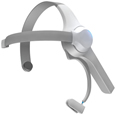 |
This latest release adds experimental support for NeuroSky's $99
MindWave brain wave sensor.
Currently Vitamin-R includes experimental support for:
- visualizing "attention" and "meditation"
levels
- averaging them over a time slice
- pre-selecting the appropriate "focus" level in the
"rate your time slice" step
For more information, consult our
MindWave
page.
|
Version 1.69
26th September 2011
The new version refines the noise machine controls.
Version 1.68
7th September 2011
The new version adds the ability to automatically close all open
Finder windows at the beginning of a time slice to reduce distracting
clutter.
Version 1.67
9th August 2011
The new version adds the ability to exclude specific applications
from the "Eliminate distractions" step.
Version 1.66
19th July 2011
The new version adds advanced customization of Growl
notifications.
Version 1.65
28th June 2011
This new version adds integration with Potion Factory's
The Hit List
to do list.
The integration is the same as that already offered for Cultured
Code's
Things
and OmniGroup's
OmniFocus:
- drag & drop action items straight into Vitamin-R's objective
field
- click the hyperlink to go back to the item in The Hit List
- the item automatically gets marked as completed in The Hit List when
you log your time slice as completed
- the hyperlink in the Vitamin-R Log Book remains clickable
Beta Testers Wanted!
If you are interested in doing some beta testing on Vitamin-R, please
contact me directly at:
reiff@publicspace.net.
You will from time to time be sent links to pre-release versions of
Vitamin-R and be expected to provide insightful feedback ranging from
"it's just crashing" to "perhaps this isn't really the
way to do it at all, why don't you consider..".
Version 1.64
7th June 2011
This latest release adds support for using Vitamin-R the
Growl Notification
framework.
This is currently switched off by default, so if you want to use this
feature you need to activate it in the Notifications tab of the
Preferences dialog ("Vitamin-R" ->
"Preferences...").
Full documentation is available in the Help book ("Help"
-> "Vitamin-R Help").
Version 1.63
17th May 2011
The new release
- addresses an issue with some customized workflows.
Version 1.62
10th May 2011
The new release
- changes the default font to Helvetica Neue
- fixes a problem with sound output at the end of time slices
Version 1.61
3rd May 2011
The new release fixes two issues:
- on some machines some sounds were playing unreliably
- the bold text attributes could disappear from the objective field
upon relaunching
Version 1.60
27th April 2011
In the "notification" section of the preferences you can
now specify separate sounds or voice messages to be played when:
- you stop a time slice before it has elapsed
- you pause a time slice
- the time slice elapses
Version 1.59
19th April 2011
The new version extends the range of possible time slice and timed
break durations from 2 to 60 minutes.
Version 1.58
12th April 2011
This new version overhauls the preferences dialog and adds new voice
and sound notification behaviours.
Version 1.57
29th March 2011
This new version introduces
tags
to Vitamin-R.
Tags are simply labels associated with your time slice. You enter
them at the bottom of the objective field and separate them with commas,
semi-colons or by pressing the tab key.
Tags are logged to your log book and Vitamin-R helps you by offering
to auto-complete previously used tags.
A simple use of tags is to associate multiple time slices with the
same "project". Just use the project name as the tag.
Vitamin-R's support for tags is still at its very beginning.
In fact you can do little besides adding tags, visualize them in your
log book or export them via the CSV (command separated values)
feature.
Rest assured that tags are an integral part of the future of
Vitamin-R and that they will quickly become much more powerful. In the
coming weeks a new "reporting" feature will be added that will
give you statistics about time slices filtered by tags.
The main use for this will be to find out how much time you have
spent working on time slices associated with tags. So go ahead and tag
time slices with project and/or client names as of now and very soon,
you'll be able to use the information in billing your time to your
clients!
Version 1.56 & 1.55
10th March 2011
Version 1.56 fixes a crashing issue.
Version 1.55 fixes a minor cosmetic issue that caused the Help menu
to appear twice.
Yesterday's version 1.54 delivers the long-awaited
customizable workflow
that allows you to switch off the parts of the workflow that you may not
be interested in and decide what happens for the decision steps that are
skipped, e.g.
- switch off the "breadcrumbs" or the "priming"
technique features
- skip the "eliminate distractions" step
- always use 25 minutes for the time slice duration rather than asking
each time
- always take a 5 minute timed break after successfully completing an
objective
- automatically extend a time slice if the objective hasn't been
completed yet
- etc, etc.
This will be of particular value to those who want to implement the
more rigid
Pomodoro Technique
workflow that dictates the length of the "pomodoros" and
"breaks".
You can customize the workflow from the "Preferences..."
dialog.
Version 1.54
9th March 2011
This new release delivers the long-awaited
customizable workflow
that allows you to switch off the parts of the workflow that you may not
be interested in and decide what happens for the decision steps that are
skipped, e.g.
- switch off the "breadcrumbs" or the "priming"
technique features
- skip the "eliminate distractions" step
- always use 25 minutes for the time slice duration rather than asking
each time
- always take a 5 minute timed break after successfully completing an
objective
- automatically extend a time slice if the objective hasn't been
completed yet
- etc, etc.
This will be of particular value to those who want to implement the
more rigid
Pomodoro Technique
workflow that dictates the length of the "pomodoros" and
"breaks".
Version 1.53
7th March 2011
This release adds support for custom Dropbox folder locations.
Version 1.52
2nd March 2011
This release fixes an issue that prevented users from switching to
dropbox cloud synching of their log books before they completed their
first time slice.
Version 1.51
23rd February 2011
This new version now supports
log book synchronization between multiple Macs, so that you can
work on multiple machines but have a single log book and produce
statistics based on your work in multiple locations.
The new mechanism is based on Dropbox and will require that you
create a free Dropbox account if you do not yet have one.
You can activate the new synchronization service via the
"Sync" tab in the Preferences... dialog. Full documentation is
provided in the Help book (choose "Vitamin-R Help" in the
"Help" menu).
Please contact us if you experience any problems.
Version 1.50
20th February 2011
This is a minor bug fix relating to the automatic software updating
system.
Version 1.49
18th February 2011
This is the first Mac OS X 10.6 Snow Leopard-only release of
Vitamin-R.
Dropping the Mac OS X 10.5 backwards compatibility has allowed us to
clean up the code, use more modern build tools, make the download
smaller, and most importantly, we hope that this move will allow us to
further speed up the development of the tool.
We usually support the current version of Mac OS X and one previous
version to allow customers plenty of time to upgrade.
Apple has, however, made a number of moves in the last few weeks that
make it harder than ever to maintain backwards compatibility. The Mac
App Store requires that code be targeted to Mac OS X 10.6 Snow Leopard
and Apple's XCode 4 development tools that have gone to Gold Master last
week have dropped the Mac OS X 10.5 SDK and PowerPC support
entirely.
Vitamin-R was developed from scratch for Snow Leopard using many Snow
Leopard-only APIs. Shortly after its launch last April, we got so many
requests for a Leopard-compatible version that we spent some
considerable time creating a backwards compatible version. At the time,
it looked as if this was going to be a one-time investment and as long
as we didn't use any further Snow Leopard-only technology we would be
fine. Unfortunately, the reality was quite differentt and a good 90% of
all bugs that we've squashed in Vitamin-R this past year, were
Leopard-only bugs and almost all of them due to Apple's implementation
of the Objective-C 2.0 64-bit garbage collected architecture that was
introduced in Leopard not quite being up to scratch until Mac OS X 10.6
came out. As a result we have spent endless hours trying to find fixes
and workarounds for these problems and we've ended up spending nearly as
much time on fixing these Leopard problems as in moving Vitamin-R
forward.
In other words, the time has come to get ready for Mac OS X 10.7 Lion
and drop Mac OS X 10.5 Leopard compatibility a few months early.
Obviously, the current, 1.48 release will remain on the website
indefinitely and we've made sure that the auto-update feature won't
overwrite your current version with an incompatible Mac OS X 10.6-only
version by mistake.
Version 1.48
7th February 2011
More Mac App Store-related fixes.
This is also probably going to be the last
Mac OS 10.5 Leopard compatible
release.
Version 1.47
4th February 2011
This new version allows the console output to be suppressed by
deactivating it from the "Miscellaneous" tab of the
"Preferences..." and fixes a problem with preferences not been
saved correctly due to recent Mac App Store changes.
Version 1.46
2nd February 2011
This new version further improves keyboard navigation and alerts
trial users to the absence (due to Apple restrictions) of dockless
operation from the Mac App Store version of Vitamin-R.
Version 1.45
29th January 2011
This new version makes it easier to purchase from the Mac App
Store.
Version 1.44
26th January 2011
This new version makes substantial stability improvements on Mac OS X
10.5 Leopard.
Version 1.43
26th January 2011
This new version restores software updating and resolves a startup
problem on Mac OS X 10.5 Leopard, both related to Mac App Store
changes.
Version 1.42
25th January 2011
This new version includes a number of minor bug fixes:
- global keyboard shortcuts are now less likely to conflict with
existing shortcuts
- fixed a display value problem when "live" adjusting time
slice durations
- fixes a problem relating to URLs within the Now & Later and
Objective text areas
- a number of minor fixes for the Mac App Store version
Version 1.41
19th January 2011
It is now possible to adjust the duration of a time slice during the
time slice.
Version 1.40
6th January 2011
The new version:
- eliminates the throughly uncool "jumping" around of the
main dialog when the application starts up
- fixes a bug in FastType affecting bulletted lists
- goes back to the GCC 4.2 compiler because of problems with the
generated code of Mac OS X Leopard
Version 1.39
3rd January 2011
This new version delivers a number of bug fixes and minor
improvements:
- fixes a refresh problem for the main popup window
- fixes a bug in the duration slider
- introduces a new log file naming convention in preparation for our
upcoming Mac-to-Mac synching feature using Dropbox
- automatic migration from old to new log file naming convention at
first launch
- internal changes to allow Vitamin-R to be submitted to the Mac App
Store
- updated version of BGHUDAppKit controls
As mention in passing above, we are working on Mac-to-Mac
synchronization of log files using the free Dropbox service. If anybody
is interested in beta testing this feature please contact us at:
support@publicspace.net
Version 1.38
7th December 2010
The new version allows the logs to be exported in CSV format.
Comma-Separated Values (CSV) is a standard data exchange format which
is supported by most spreadsheet, data analysis, billing and database
programs.
You can perform an export by selecting "Export to CSV
file..." in the "Logs" submenu of the "Tools"
menu. Full documenation of the used format is available under
"Vitamin-R Help" in the "Help" menu.
Version 1.37
30th November 2010
The new release adds a new week day statistical chart, which allows
you to become more aware about how your ability to concentrate evolves
over the course of the week.
Version 1.36
24th November 2010
The new release replaces the Adobe Flash-based charting feature with
an HTML 5-based implementation.
Version 1.35
16th November 2010
The new release adds the ability to visualize statistics about your
time slices using the new "Statistics Window" available under
the "Tool" menu or by pressing Command-1.
The chart displays both the total time worked on time slices over
various periods and your concentration levels during this time. More
information can be found in the Help book available under the
"Vitamin-R Help" item in the "Help" menu.
This is but the first of many charts and analysis options planned for
future releases, but already allows you to detect patterns, such as your
most productive days of the week, compare your concentration levels over
the course of week, etc.
As such it's an invaluable resource for learning more about your own
work habits and making changes to how you work and how you plan your
week. Expect much more in future releases.
Version 1.34
5th November 2010
This release fixes a bug introduced in Tuesday's release that could
cause the main Vitamin-R window to appear with a zero width on some Mac
OS X 10.5 Leopard systems.
Version 1.33
2nd November 2010
This release focuses on consolidating the vast array of changes and
enhancements made to the tool in the first 6 months after its initial
release in April 2010. In fact, the frenetic pace of development
resulted in no less than 32 updates and have transformed the tool from
an innovative experiment into a day-to-day work horse.
Many of the changes are "under the hood", but result in a
much improved overall user experience. Rough edges, especially in the
window management have been removed, inconsistencies in behaviour
between the various modes that the tool can be run in (as a full
application, a dockless application, with or without automatic window
hiding, etc.) have been removed, disparate internal structures unified,
keyboard-only operation has been streamlined, menus consolidated, etc,
etc.
All in all, this latest release is a solid foundation for the
improvements planned for the next 6 months of continuous
development.
We hope you'll enjoy using it.
Version 1.32
12th October 2010
The new version provides a host of minor enhancements.
- improved behavior when working with multiple Mac OS X
"Spaces"
- more robust switching between "full application" and
"dockless" operation.
- enhanced bullet list behavior
- "Noise Machine Integration" topic listed directly in the
"Help" menu
- appearance panel closing behavior fixed
- intermittent now & later board font properties oddness
fixed
Version 1.31
6th October 2010
This new version provides integration between Vitamin-R and our new
Noise Machine
product.
Noise Machine is a white, pink and brown noise generator and
soundscape player designed to help you mask distracting noise and
produce an ambience suitable for concentrated work.
It comes with 17 additional high quality soundscapes:
- Air Conditioning
- Babbling Brook
- Beach with Seagulls
- Savannah Crickets at Night
- Deep Space Rumble
- Engine Room
- Fierce Wind
- Florida Keys Light Rain
- Icy Stream
- Icy Cold Wind
- Little Italy Sidewalk Café
- Ocean Surf
- Idyllic Morning in the Park
- Thunder
- Thunder with Rain
- Reactor Core
- Waterfall
Best of all, Noise Machine is
free
for all registered Vitamin-R users.
Vitamin-R can play the sounds contained in Noise Machine
automatically when a time slice starts and stop it when the time slice
is over, via the "continuous sound" option in the
"Preferences...". You can also manually activate the sounds in
the "Noise Machine" section of the "Tools" menu.
Noise Machine does not need to be running for this to work, but it
will need to be installed in the Applications folder and you do need to
restart Vitamin-R after installing Noise Machine so that it can detect
the sound files.
We hope you enjoy this new feature.
Version 1.30
28th September 2010
The new version adds an improved version of the noise machine
included in version 1.29:
- completely gapless playback for white, pink and brown noise
- synchronized with the beginnig and end of a time slice
- second completely separate noise machine that can be manually
controlled via the Tools -> Noise Machine menu
- important Leopard fix that should effectively work around a Leopard
bug that caused crashes on some systems
- improved error logging for problems when switching between
"full application" and "dockless" operation
Version 1.29
11th September 2010
This is a fix for a situation where you potentially had to click the
unlock code link twice in order to unlock the program.
Version 1.28
7th September 2010
This release improves support for Francesco Cirillo's Pomodoro
Technique by allowing you play a continuously ticking clock sound during
your time slices.
The Vitamin-R productivity system and Cirillo's Pomodoro Technique
have much in common and many Pomodoro users are using Vitamin-R to
implement a more flexible version of this technique. Cirillo advocates
the use of a continuously ticking clock to focus attention on the task
at hand and to "condition" yourself to concentrate as soon as
you hear the sound.
Version 1.28 also includes a basic white, brown and pink noise
generator.
We are working on a standalone noise generator
called "Noise
Machine"
which will be released in the next few weeks. It will also be able to
play a variety of "soundscapes". Most if not all of its
features will be integrated directly into Vitamin-R as well and
"Noise Machine" will be
free
for all Vitamin-R owners. It will unlock
automatically
if it finds an unlocked version of Vitamin-R.
Version 1.27
25th August 2010
This release adds sound and speech notifications during and at the
end of timed breaks.
Tip:
If you have not yet tried timed breaks, please do. They provide a good
way of enjoying a guilt-free break while making sure that you get back
to work within a reasonable amount of timed. They only need a little
getting used to while delivering great benefits.
Version 1.26
18th August 2010
This release simplifies the way in which the duration of a timeslice
is reported in the user log to avoid confusion.
Version 1.25
12th August 2010
This release (hopefully permanently) fixes a intermittent crashing
bug affecting some Mac OS X 10.5 Leopard machines, caused by a memory
management problem in the Mac OS X 10.5 text system.
Version 1.24
5th August 2010
This release fixes a problem where the sound preferences would not
work correctly.
Version 1.23
4th August 2010
This latest release brings back the
log book
feature introduced in version 1.22:
- more resilient to missing, incomplete or incorrectly formatted
data
- user logs only read at the moment when the information is
needed
The new version also adds:
-
the ability to select between three different menu bar icons (useful
mostly when running on smaller laptop screens)
- fixes the gear menu on the Now & Later Board to correctly allow
click and drag operation
- fixes a size problem with the objective text view
Version 1.22
30th July 2010
This latest release fixes a crashing bug with the previous
release.
The Log Book feature which caused these crashes has been removed
until the problem can be fixed properly.
If you have already auto-updated to version 1.21, you will need to
manually download this version from the web site to replace the old
version. Sorry!
Version 1.21
28th July 2010
This latest release adds a
log book
that allows the time slice logs to be consulted more easily.
You can reach this feature via the Command-L keyboard shortcut or
under the "Log" menu.
Version 1.20
22nd July 2010
This latest release make a number of improvements and
refinements:
- can now speak a custom sentence at the end of a time slice
- adds a new alarm sound for signalling the end of a time slice
- updates the preferences pane
- makes some cosmetic refinements to the menu bar item
Version 1.19
15th July 2010
This latest release fixes a bug with the unlocking mechanism
introduced by the Things integration.
Version 1.18
13th July 2010
This latest release delivers the much awaited integration with
Things
from Cultured Code.
- drag & drop to-dos from Things into Vitamin-R's objective
field
- click the newly created hyperlink to get back to your to do in
Things
- when you mark the objective as completed in Vitamin-R, all
associated to-dos are marked as completed and moved to the Log Book in
Things
- Help Book updated with "Things Integration" section
It is also now possible to dis-able the auto-hiding of Vitamin-R's
the main pop up window.
Version 1.17
6th July 2010
This latest release fixes minor issues with the keyboard navigation
and operation as a dockless application.
Version 1.16
29th June 2010
The new release features numerous refinements of the text editing
features and improves
OmniFocus
integration.
Version 1.15
24th June 2010
The new release prevents accidental deletion of now & later board
sheets.
Version 1.14
22nd June 2010
The new release allows for greater control over text editing
features:
- a default font for all text views can be selected
- rich text editing features, such as spell checking, grammar
checking, smart dashes, smart quotes, etc can now be switched on and off
globally from the preferences
Reminders are now also played during time slice extensions and a
Leopard-only crashing bug has been fixed.
Version 1.13
15th June 2010
This release focuses on the Now & Later Board.
Some people have expressed confusion about the strikethrough text
trait and felt that it had become "sticky". The new release
makes it much easier to understand what is happening and how to get out
of the "strikethrough" mode. The main text traits (bold,
italic, underline and strikethrough) are now displayed in a mini text
toolbar at the bottom of the window. This makes it obvious which text
traits are currently active, and allows them to be toggled on and off
more conveniently.
In addition, two new items were added to the gear menu to facilitate
working with the strikethrough text trait. "Make Plain Text"
strips the selection of all text traits and "Strikethrough"
toggles the trait.
Version 1.12
8th June 2010
This release adds the Command-Up Arrow shortcut key for accessing the
"gear" menu quickly via the keyboard.
Version 1.11
1st June 2010
This release allows the tool to run as a "dock-less"
application being accessible solely via its menu bar status item and its
global keyboard shortcuts, thus making it much less obtrusive as it does
not appear in the dock or the Command-Tab application switching
list.
Click the (R) icon in the menu bar or press Control-R to activate the
application. Right-click the (R) icon to bring up the main menu.
If you prefer working with a "full" application that
presents a menu bar, a dock icon and appears in the Command-Tab
application switching list, select "Run as Full
Application..." from the "Gear" menu.
Version 1.10
17th May 2010
This release fixes the global Control-R shortcut.
Version 1.09
17th May 2010
This release fixes a bug that affects only users who have chosen to
remove the "Start Timed Break" shortcut.
Version 1.08
17th May 2010
This release fixes a bug that affected the later pad keyboard
shortcut and its customization.
Version 1.07
11th May 2010
This release delivers an integration with OmniGroup's popular
OmniFocus
to-do list manager.
Vitamin-R is designed to complement traditional to-do list managers
and enrich them with better support during actual task execution. The
integration allows tasks to be dragged and dropped directly from
OmniFocus into Vitamin-R's "objective" field where this will
create a clickable link that brings the user straight back to the task
in OmniFocus. These links are included in the time slice log files
created by Vitamin-R and remain clickable.
When a time slice whose objective is linked to an OmniFocus task is
logged as "completed" in Vitamin-R, the item will
automatically be marked as completed in OmniFocus.
This behavior can be switched off from the Preferences dialog.
Similar integrations with Cultured Code's
Things
and other to-do list managers are planned for future releases.
Version 1.06
5th May 2010
This is a fairly big release that delivers a number of usability
improvements and cosmetic changes.
We have changed the default
"pop-up" window style
to more closely resemble the Mac OS X Snow Leopard dock menu
"bubbles" complete with rounded corners, transparency and
white outline.
Better still, we have provided you with extensive control over how
the pop-up window is drawn. Select the "Appearance"
item in the "Vitamin-R" menu and you will be furnished with
controls allowing you to change the window background color and opacity,
the rounding of the corners, the insets, the size of the "top
arrow", the borders, the gradient, etc.
If you preferred the "old" more rectangular style, it's
easy to imitate it with the help of the appearance panel.
We'd love to see what you come up with so, please feel free to send
screenshots of your own creations to
support@publicspace.net. We
are thinking about adding a few "user presets" so if you want
to share your creations, please do not hesitate.
On the usability front, the biggest improvements center around
keyboard control. You can now control the entire application
without taking your hands off the keyboard.
Command-Left Arrow
Command-Backspace
|
Go the previous screen |
Command-Right Arrow
Command-Return
Command-Enter
|
Go to the next screen |
Escape
Command-W
|
Close the pop-up window |
| Control-R |
Toggle Vitamin-R |
| Tab |
Next field |
| Shift-Tab |
Previous field |
| Control-Tab |
Next field when in text field |
| Control-Shift-Tab |
Previous field when in text field |
In order to be able to tab through all controls, you will need to
switch on "Full keyboard access":
- go to the "Apple" menu
- select "System Preferences..."
- Select "Keyboard"
- Select the "Keyboard Shortcuts" tab
- choose "All Controls" in the "Full Keyboard
Access"
The other major improvement in this new release is that it is now
possible to
pause time slices.
Other changes include better menu bar item tracking, minor bug fixes,
tweaks, etc.
Version 1.05
27th April 2010
Fixes a few more teething problems:
- Now & Later Board contents are now once again saved
automatically to prevent data loss in the event of a crash.
- the pop-up window now sticks to its menu bar item even when this is
moved.
- the pop-up window now positions itself properly if the dock menu is
positioned to the right of the main screen.
Version 1.04
26th April 2010
Major changes to the Now & Later Board and the FastType
feature:
- "gear" menu gives easy access rich text controls: rulers,
fonts, styles, colors
- bullets now create RTF text lists providing more intuitive control
over list creation, indentation, etc.
- new "numbered" lists
- much improved undo behavior
- Command-W and Escape key dismiss the window
Workflow changes:
- can now move to next screen via Command-Right Arrow or
Command-Return
- can move back to previous screen via Command-Left Arrow or
Command-Backspace
Version 1.01/ 1.02/ 1.03
20th April 2010
Version 1.03 fixes Leopard compatibility that was briefly broken in
version 1.01 and 1.02 that were uploaded earlier today; if you have
already downloaded 1.01 or 1.02 on a Leopard machine, you need
re-download and install the application via drag & drop. Sorry!
This is the first of a series of hopefully quick releases that try to
sort out some teething problems with version 1.0.
This release:
- fixes the shortcut customization option for the "Read Objective
Aloud" feature
- adds a help book entry on how to choose the "right"
duration for your time slice.. and in the process it clarifies the
significance of the "Motivation Level" and "Resistance
Level" indicators
-
updates the help book with clarifications, corrections and additions
- replaces the term "totalling", which in US English is
spelled with one L and in UK English is spelled with two, thus causing
unsightly red underlines either in the UK or the US..
- activates Undo for the objective text area in the "Rate Your
Time Slice" UI
- allows the font and color to be freely chosen for the objective text
area
Version 1.0
17th April 2010
This is the first full release of Vitamin-R.
Version 0.10
15th April 2010
It would appear that the iCal integration introduced in version 0.8
yesterday is causing high CPU usage on some machines.
This release disables the feature until the problem can be properly
analyzed and a full fix can be released.
Version 0.9
15th April 2010
This is the first release candidate for version 1.0 of Vitamin-R.
The release adds a new feature for managing to-do lists within the
now & later board.
- Typing
--
(two minus signs) at the end of a line of text will strike out (draw a
line all the way across) the entire line.
In practice this works better than adding the checkmark (type
done'
) at the end of the line, because it's easier to see, not to mention more
satisfying than just deleting the line.
The new version also:
-
updates the Help Book
- solves a quitting problem where the Now & Later Board would
obscure the
quit dialog.
The performance analysis and statistics features are not ready for
prime-time yet, but will be rolled out shortly after the upcoming 1.0
release.
Version 0.8
14th April 2010
The new version adds more sophisticated time controls allowing you to
easily judge how a time slice fits into your schedule.
On Snow Leopard, the time control shows calendar events around the
current time slice to provide a better context for your decisions.
The new version also:
-
make changes to how the windows work with other applications eliminating
some awkward situations
- changes some font settings in the Now & Later board
- makes the objective area fully aware of hyperlinks (useful when
working with OmniFocus for instance), images, etc.
- corrects some spelling mistakes and UK English phrasings
- sets the defaults to more frequent speech and sound reminders
Your feedback is always important but especially crucial at this
stage of development, so please do not hesitate to contact us at:
support@publicspace.net.
Version 0.7
8th April 2010
We are quickly approaching version 1.0, so there are plenty of
refinements in the latest update:
- Now & Later Board uses black text on de-saturated coloured
backgrounds for better legibility and easier integration with other text
sources
- main window now remains open when the application is inactive which
makes dragging and dropping task items from OmniFocus, Things and other
sources much easier
- all text templates revised with easier to follow and shorted
descriptions
- priming template rewritten
- hiding and quitting dialogs updated
- background colors for the different pads can now be set in the
Preferences dialog
- various minor and cosmetic refinements
Version 0.6
2nd April 2010
New release in this release:
- Now & Later Board background transparency can now be adjusted
with a slider
- darker Now & Later Board window
- links to website
- updated main window
Version 0.5
31st March 2010
This new release:
- fixes some issues with the logging feature
- fixes objective editing from the info window
- makes various cosmetic changes
- displays the current day of the trial in the window
Version 0.4
30th March 2010
This new release features a complete user interface re-vamp based on
early customer feedback.
The wordy interface is replaced with a streamlined menu bar pop-up
that is somewhat reminiscent of the iPad menus. We feel that this has
made the whole user experience much more intuitive as it is much simpler
to figure out what is happening at the moment and what options you
have.
Version 0.3
29th March 2010
This release fixes a start-up bug on Mac OS X 10.5 Leopard.
Version 0.2
29th March 2010
This release fixes a start-up bug that affects some systems.
Apparently we have run into a limitation of the ShortcutRecorder
framework that we are using.
Meanwhile, the main feedback we have received so far is that the
interface is too wordy and thus feels clunky and overcomplicated.. so we
are currently busy re-working the interface to bring it to minimalist
perfection. Work is going very well and we think you'll love the sparkly
clean new style. We sure do. Expect a first glimpse later this week.
Version 0.1
26th March 2010
After the first fews days of public testing, the consensus amongst
testers seems to be that the program is already stable and has caused no
major problems, so we are dropping the "beta" and are going
for the pre-release countdown.
The current version number basically means "stable enough to
work with on day-to-day basis, but some features are not yet 100%
complete". Expect a 1.0 release in the next few weeks.
Overnight a crash report relating to Apple Data Detectors in the Now
& Later Board reached us. Data detectors are Apple’s wizardry that
detects phone numbers, addresses and dates in your text documents and
brings up options like creating an appointment in iCal, etc. They can be
very handy which is why I switched them on, but they have never been
very stable on Mac OS X 10.5 Leopard.
Unfortunately, there is little that can be done to address the
problem because the crashing code is all Apple's and all third party
developers can do is to switch the feature on or off.
While investigating the problem, I came across lots of crashes in
Mail.app on Leopard, so it looks like the data detectors simply are not
working that reliably on Leopard.
As a result, the 0.1 release of Vitamin-R switches off the automatic
data detection on Leopard by default. Data detectors remain switched on
in Snow Leopard. Whichever platform you are on, you can manually switch
automatic data detection on or off in the Preferences dialog. This may
lead to the occasional crash on Leopard, but this is probably a very
rare problem.
In my experience, people are very reluctant to report problems or
give feedback on pre-release software, assuming that the developer must
be getting tons of reports of the problems that they experience.
Unfortunately, this also means that it is not uncommon that no problems
are reported in beta testing and then when the 1.0 release comes out,
everybody goes “I can’t believe that still haven’t fixed this!”.
So please, please. Report any problems you encounter.
We can only fix problems that we know about!
Version 0.01 beta 2
25th March 2010
This second beta streamlines the workflow so that you can start a new
time slice as soon as you have completed the previous one without having
to take a break in between.
Taking regular guilt-free breaks is still important, but there is no
point in forcing breaks when none is needed.
The new release also fixes a bug where Vitamin-R would quit instead
of hiding.
Version 0.01 beta 1
24th March 2010
This is the first public beta release of our new productivity
application.