The short answer: a work log is one file in which you write, as the day goes, what you did, what you decided and where you stopped, each line under a date and ideally with a time. It takes two or three minutes a day. It pays you back every time someone asks what you did last week, every time you return to a task after an interruption, and once a year when you have to write down what you achieved. Keep it in plain text, keep the entries short, and make adding a line so easy that you do it without leaving what you are working on. The log that survives is the one that costs nothing to write.
A disclosure up front. I’m the developer of Burst Notes, a paid Mac app for adding lines to Markdown files from the keyboard, and a work log is one of the things people use it for. I describe the free ways first, and they are perfectly good.
What a work log is, and is not
It is a record, written for a reader who is you in a week, a month or a year. It is not a to-do list, which looks forward; not a timesheet, which counts hours against projects; and not a diary, which is about how you feel. Engineers have kept lab notebooks and ships have kept logbooks for centuries for the same reason: memory rewrites what happened, and a line written at the time does not.
A close relative is interstitial journaling, which uses the same kind of timestamped line but for a different purpose: clearing your head between tasks and choosing the next one on purpose. If your problem is focus during the day, start there. If your problem is that the days leave no trace, start here. Plenty of people end up with one file that does both.
Where it pays for itself
- The stand-up and the weekly report. “What did you do yesterday?” stops being a memory test. You read three lines aloud.
- Picking up where you left off. The most valuable line in any log is the last one before an interruption: stopped here, next step is this. After a weekend, a holiday or a week on another project, that line saves you the hour of working out what you were thinking.
- The performance review. The developer and writer Julia Evans popularised the brag document in 2019: a running list of what you accomplished, kept because neither you nor your manager will remember in December what you shipped in February. A work log is the raw material. Ten minutes a month to copy the highlights into a “wins” section and the review writes itself.
- Decisions and their reasons. “Chose the queue over the cron job because of the retry behaviour” is worth more six months later than the code is. Nobody remembers why.
- Debugging and research. What you tried, in order, with what result. It stops you trying the same thing twice, and it turns into the write-up afterwards.
- Estimating. With timestamps, the log shows how long things really took, which is rarely how long you would have guessed.
What to write
Short lines, written at the time, in your own shorthand. Useful kinds of entry:
- Done: what you finished, named so that a colleague would recognise it
- Decided: the choice and the one-clause reason
- Stuck: what is blocking you and who or what you are waiting for
- Stopped at: where you are leaving an unfinished task and the next step
- Learned: the command, the setting, the name of the person who knows
And what to leave out: anything you are writing to look busy, anything confidential that should not sit in a text file, and prose. If an entry needs more than two lines, it is probably a document, and the log should link to it.
A template
One file, a header per month, a header per day, bullets underneath. Copy this into a file called
worklog.md and adjust:
# Work Log

## Wins
- (copy the highlights here once a month, for reviews)

## November 2026

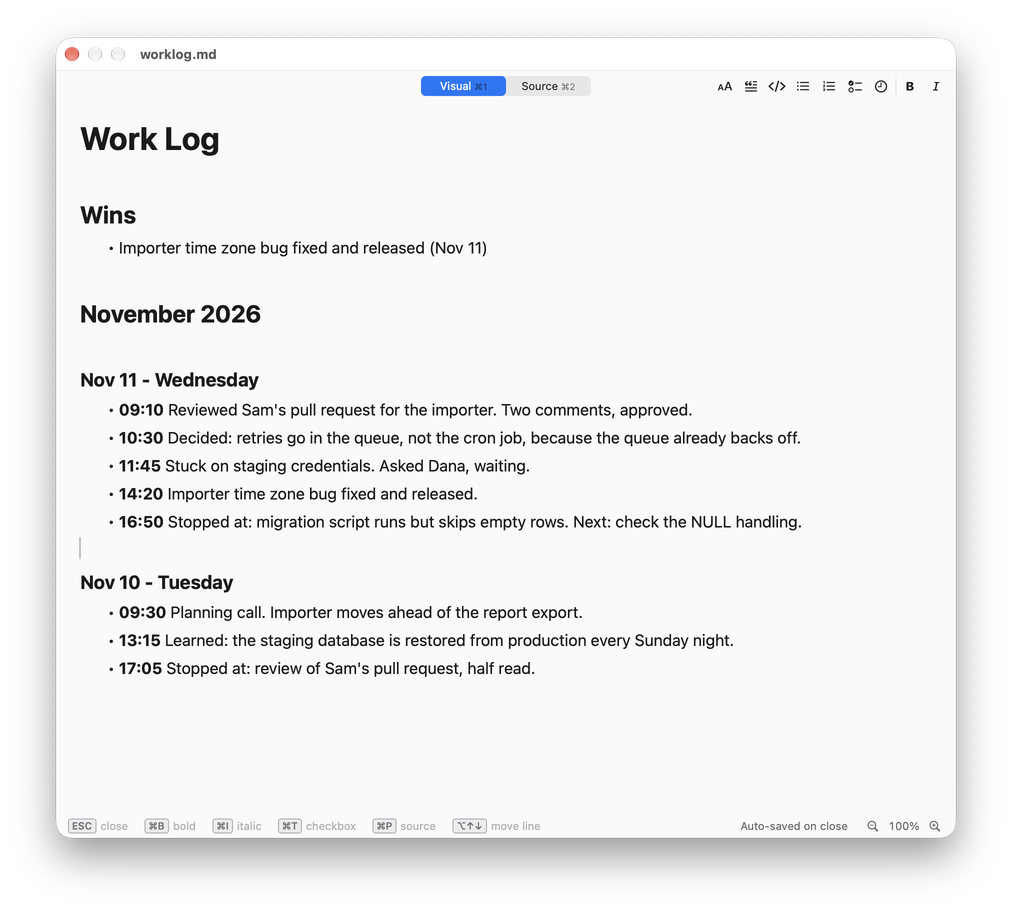
### Nov 11 - Wednesday
- **09:10** Reviewed Sam's pull request for the importer. Two comments, approved.
- **10:30** Decided: retries go in the queue, not the cron job, because the queue already backs off.
- **11:45** Stuck on staging credentials. Asked Dana, waiting.
- **14:20** Importer time zone bug fixed and released.
- **16:50** Stopped at: migration script runs but skips empty rows. Next: check the NULL handling.

### Nov 10 - Tuesday
- ...
Two choices to make once and then leave alone. Newest day first or last? First means today is always at the top of the file; last reads like a book. Either works. One file or many? One file per year is the simplest thing that stays manageable, and a single file is easy to search. A file per day sounds tidy and makes “what did I do in March” a search across thirty files.
Some people prefer fixed sections for each day, such as Completed, In Progress, Blocked and Tomorrow. That suits an end-of-day summary. A timestamped running list suits writing as you go. Writing as you go is more accurate, because by five o’clock you have already forgotten the morning.
Keeping it going
The log fails in a predictable way: you write it faithfully for eight days, have one frantic day, skip it, and never go back. Three things prevent that.
- Lower the cost of a line to a few seconds. No window to find, no scrolling, no typing the time. This is a tooling question and the next section is about it.
- Attach it to something that already happens. The end of a timed work session, the moment before you open your mail, the moment you close the laptop. If you work in timeboxes, one line per box is a natural rhythm.
- Forgive the gaps. A log with holes is still far better than none. Write today’s line and do not try to reconstruct last week.
Tools on a Mac
Free and built in
- TextEdit or any text editor. Keep the file open in a window of its own. It costs you a window switch and typing the time by hand.
- The Terminal.
echo "- $(date +%H:%M) fixed the importer" >> ~/worklog.mdappends a timestamped line without opening the file. Developers who live in a terminal often need nothing more. - Apple Notes. A pinned note works, and Quick Note gets you to it fast. Your log then lives in the Notes database rather than in a file, and you type the time yourself.
- Shortcuts. Ask for Input followed by Append to Text File makes a small prompt that you can put on a keyboard shortcut.
Notes applications with daily pages
Obsidian’s daily notes and Logseq’s journal give you a dated page per day in plain Markdown, and both have templates that can insert the date. They are a good home for a log if you already work in them. The cost is that adding a line means switching to the application, which is also where the rest of your notes are waiting to distract you.
A capture tool
Burst Notes is my answer to the cost-of-a-line problem. It stays in the menu bar. A
global shortcut, Command-Shift-B, opens a small command window over whatever you are doing. You
type a few letters to pick a header in your log, press Return, type the line and press
Command-Return. The line is appended under that header in your own Markdown file and you are back
in the application you came from.
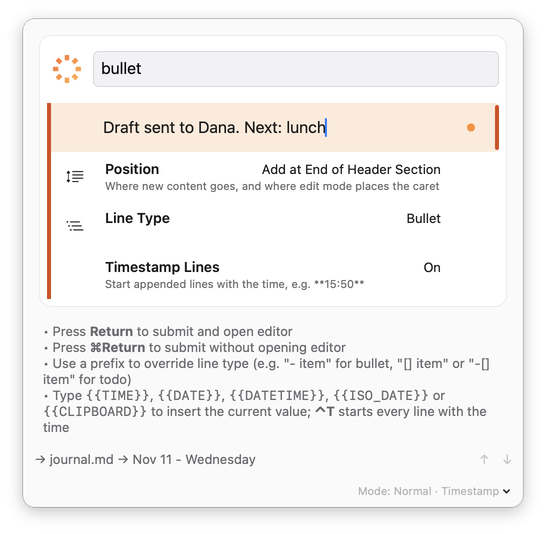
Version 1.09 added what a log needs:
- Timestamp Lines (
Control-T) starts every captured line with the time of day in bold, so the entries above are written without typing a single digit - placeholders fill themselves in as you type:
{{DATE}}becomesNov 11 - Wednesday,{{ISO_DATE}}becomes2026-11-11, and{{CLIPBOARD}}pastes what you last copied, such as a ticket number or a link - Command-Shift-D in the built-in editor inserts the date and time at the cursor
- a Work Log template creates a file with this month, this week and the last few days already laid out, if you prefer the fixed-sections style
The manual page on Timestamps and Placeholders has the full list.
Burst Notes is a one-time purchase with a 14-day trial, and because the log is an ordinary .md
file, you can stop using it at any time and lose nothing.
FAQ
What is a work log? A dated, running record of what you did at work: tasks finished, decisions made, problems hit and where you stopped. It is also called a work journal, a work diary or, among engineers, an engineering notebook.
What should a daily work log include? The date, and under it a handful of short lines: what you completed, what you decided and why, what is blocking you, and where you left unfinished work. Times are optional and worth having.
How is a work log different from a to-do list? A to-do list says what you intend to do. A work log says what actually happened. They complement each other and can share a file.
How long should it take? Two or three minutes a day in total, spread over a few lines written as you go. If it takes longer, the entries are too long.
Should I keep my work log in Word, a spreadsheet or plain text? Plain text or Markdown. It opens instantly, searches instantly, works with every editor and will still be readable in twenty years. A spreadsheet is worth it only if you need to total hours.
Is a work log the same as a brag document? No, but one feeds the other. The log is everything, written daily. The brag document is the short list of achievements you extract from it for reviews and for your CV.
Can I keep a work log and an interstitial journal in the same file? Yes. The entries look the same. The journal habit adds a “next:” to each line. See my guide to interstitial journaling.
Sources
- Julia Evans, Get your work recognized: write a brag document, 2019.
Written by Frank Reiff, developer of Burst Notes and Vitamin-R at publicspace.net, which has made Mac software since 1996. See also my guides to interstitial journaling, timeboxing and deep work on a Mac.