The short answer: interstitial journaling is a habit of writing one timestamped line in the gap between two pieces of work. You note the time, what you just finished or abandoned, and what you are about to do. That is all. The journal does three jobs at once: it closes the task you are leaving so it stops occupying your head, it makes you choose the next task on purpose, and at the end of the day it is a record of where the hours went that nobody had to reconstruct. It needs no special application. A text file and the discipline to write the line are enough, though the discipline is the hard part and most of this guide is about making the line cheap enough that you actually write it.
A disclosure up front. I’m the developer of Burst Notes, a paid Mac app for adding lines to Markdown files from the keyboard, and of Vitamin-R, a focus timer. Both are relevant to this technique and I mention them where they fit. Everything here also works with the free tools I describe first.
Where it comes from
The name was coined by Tony Stubblebine in 2017, in an article for the Better Humans publication on Medium whose title was a claim: replace your to-do list with interstitial journaling. His observation was that the moments between tasks, the interstices, are where a working day leaks. You finish something, you are briefly unoccupied, and the unoccupied brain reaches for mail, chat or a browser tab. Twenty minutes later you surface with no memory of having decided to stop working. His fix was to give the gap a job: before you do anything else, write down the time and a sentence or two about what you just did and what comes next.
The idea spread through the note-taking community over the next few years, largely because outliner tools with daily pages made a timestamped running log feel natural. But the technique does not depend on any of them. It is the oldest kind of record there is: a logbook.
Why one line in the gap helps
It closes the open loop. When you switch away from an unfinished task, part of your attention stays behind. The organisational researcher Sophie Leroy named this attention residue in a 2009 paper and showed in two experiments that people who moved on without a sense of closure on the first task did worse on the next one. A related line of research, by E. J. Masicampo and Roy Baumeister in 2011, found that unfinished goals stop intruding once you have written a concrete plan for them. A journal line that says where you stopped and what the next step is does exactly that. You are not finishing the task. You are giving your brain permission to let go of it.
It turns a drift into a decision. The gap between tasks is where procrastination lives, because nothing in particular is supposed to happen there. Writing “next:” forces a choice, and a choice written down is harder to quietly swap for the inbox. This is the same reason timeboxing asks you to name one objective before you start the clock.
It keeps the record that memory will not. Ask yourself on Friday what you did on Tuesday afternoon. The journal knows. That is useful for timesheets and status reports, and more useful still for noticing patterns: the task that always takes three times as long as planned, or the hour after lunch that never produces anything. If the record matters to you more than the head-clearing, my guide to keeping a work log covers that side.
What to write
Three things, in this order, and nothing else until the habit is established:
- The time. It anchors the entry and makes the day measurable afterwards.
- What just happened. One clause. Finished, stuck, interrupted, abandoned. If you are leaving something unfinished, add the very next step, so that you can pick it up cold.
- What you are doing next. One task, named specifically enough that you could start it without thinking.
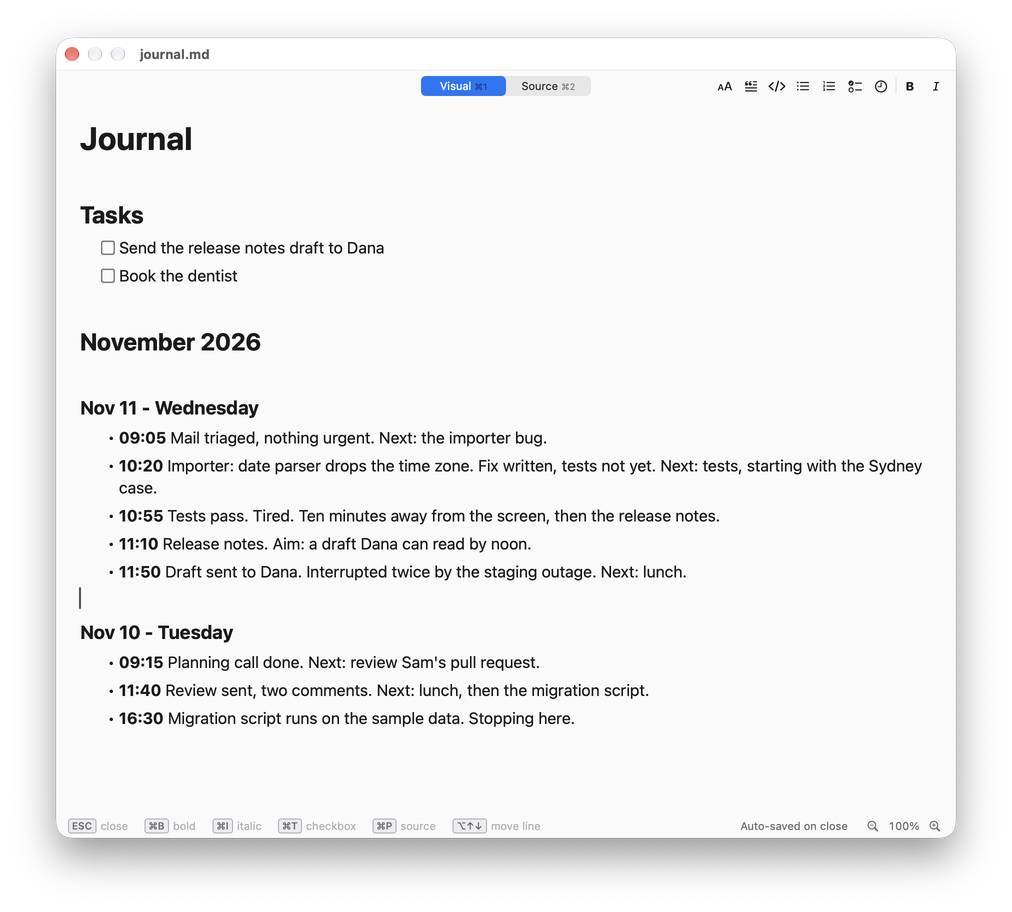
A morning looks like this:
## Nov 11 - Wednesday

- **09:05** Mail triaged, nothing urgent. Next: the importer bug.
- **10:20** Importer: date parser drops the time zone. Fix written, tests not yet.
  Next: tests, starting with the Sydney case.
- **10:55** Tests pass. Tired. Ten minutes away from the screen, then the release notes.
- **11:10** Release notes. Aim: a draft Dana can read by noon.
- **11:50** Draft sent. Interrupted twice by the staging outage, which is not mine. Lunch.
Notice what is not there: no feelings on a five-point scale, no gratitude list, no tags. Some people add a word about energy or mood, and it can be revealing after a few weeks. Add it later if you want it. An entry that takes more than fifteen seconds will not be written on a busy day, and busy days are when the journal earns its keep.
The mistakes that kill it in week two
Writing too much. The entry is a line, not a diary. If you find yourself composing, stop.
Too much friction. If writing the line means finding a window, scrolling to the bottom, working out the time and typing it, you will skip it the moment you are under pressure. The time should be typed for you and the file should be one keystroke away. The tools section below is mostly about this.
Journaling instead of working. A journal entry every four minutes is its own kind of avoidance. One line per transition is the rhythm. If you work in timed sessions, the end of each session is the natural moment, and you will write somewhere between six and fifteen lines a day.
Skipping the “next”. Half the value is in the second half of the line. “10:20 importer done” is a log. “10:20 importer done, next the tests” is a plan with a starting gun.
Abandoning the to-do list entirely. Stubblebine’s headline said replace it. In practice the journal is poor at holding things you must do next Thursday. Keep a list for commitments and let the journal run the day. Many people keep both in the same file: tasks at the top, the log underneath.
Where to keep it
Any place that is always open, timestamps cheaply and will still be readable in ten years. In rising order of convenience:
- A paper notebook. Works, and has no notifications. You write the time by hand and you cannot search it.
- A text file in any editor. Keep one file per month or per year, newest day at the top or the bottom, your choice. The only cost is switching to the editor and typing the time.
- The Terminal. One line appends a timestamped entry without opening anything:
echo "- $(date +%H:%M) importer done, next the tests" >> ~/journal.md. Wrap it in a shell function and it is a five-letter command. - The Shortcuts app. A two-step shortcut, Ask for Input followed by Append to Text File, with the current date in front of the input, gives you a small prompt you can bind to a keyboard shortcut.
- An outliner or notes app with daily pages. Obsidian’s daily notes and Logseq’s journal are the common choices among people who already live in those tools. Both store plain Markdown files.
- A capture tool on a global shortcut. This is what I built Burst Notes for, so I describe it below.
Whatever you choose, prefer plain text. A journal is a long-lived document, it should not depend on one vendor’s database, and a Markdown file can be read by every tool in the list above at once.
Doing it with Burst Notes
Burst Notes sits in the menu bar and appends lines to Markdown files you already own. Version 1.09 added the pieces this technique needs:
- Timestamp Lines. Press
Control-Tonce in the command window and every line you capture from then on starts with the time of day in bold. You never type the time again. - A global shortcut.
Command-Shift-Bfrom inside any application opens the command window. Type a few letters of today’s header, pressReturn, type the line, pressCommand-Return. The line is in the file and you are back where you were, without having seen your editor or your inbox. - Placeholders. Typing
{{DATE}}gives youNov 11 - Wednesday,{{TIME}}the time, and{{CLIPBOARD}}whatever you last copied, which is handy for dropping a ticket number or a link into an entry. In the built-in editor,### {{DATE}}on a new line starts the next day’s section. - Your own file. The journal is an ordinary
.mdfile in a folder you choose. Open it in Obsidian, in a code editor or in TextEdit whenever you like.
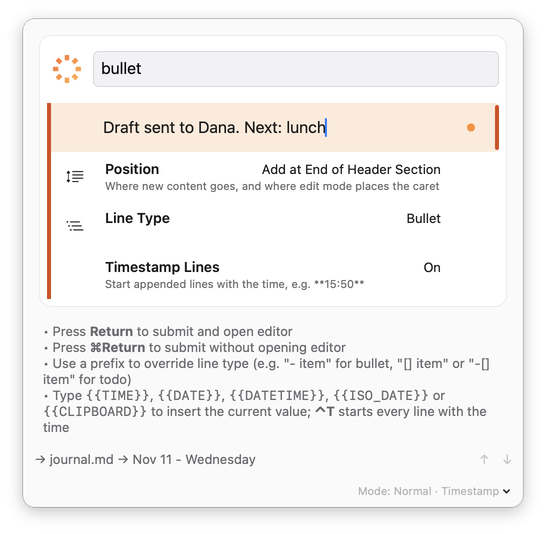
The details are in the manual under Timestamps and Placeholders. Burst Notes is a one-time purchase with a 14-day trial. If the Terminal one-liner above does the job for you, use that and keep the money.
Pairing it with a timer
Interstitial journaling and timed work sessions fit together because the timer manufactures the interstices. Whether you use the Pomodoro Technique, timeboxing or a plain kitchen timer, the bell is the cue: write the line, then take the break.
In Vitamin-R you type an objective before each time slice and rate your focus after it, which is the “next” and the “what happened” of a journal entry in structured form, kept in the app’s log book. People who use both tend to let Vitamin-R hold the plan and the statistics and use the journal for what the statistics cannot say: why the time slice went badly, what they were about to try, what the interruption was. The intruding thoughts that arrive in the middle of a time slice are a separate matter. Park those in a list and deal with them in the gap.
FAQ
What is interstitial journaling? A productivity technique in which you write a short, timestamped note every time you move from one task to another: what you just did, and what you are about to do. The name comes from interstice, a small gap. It was proposed by Tony Stubblebine in 2017.
How is it different from a normal journal? A normal journal is written once a day and looks back. An interstitial journal is written a dozen times a day, in a line or two, at the moment of each transition. It is closer to a ship’s log than to a diary.
How is it different from time tracking? Time tracking records durations against projects, usually for billing. An interstitial journal records intent and context in your own words. You can read rough durations off the timestamps, but that is a side effect.
Does interstitial journaling replace a to-do list? For running the day, largely yes. For remembering commitments days or weeks ahead, no. Most people who keep the habit use both.
Does it help with ADHD? Many people with ADHD report that it does, because it externalises working memory and puts a checkpoint at every transition, which is where attention tends to slip. I am a developer, not a clinician, and this is not medical advice. My guides to task initiation and to focus apps for ADHD cover related ground.
What is the best app for interstitial journaling? The one with the least friction for you. If you already use Obsidian or Logseq, their daily notes are fine. If you want to add lines without leaving the application you are working in, a capture tool on a global shortcut is quicker; Burst Notes is mine. A text file and a Terminal one-liner cost nothing.
How many entries should I write a day? One per transition. For most desk work that is between six and fifteen. If you are writing far more, you are probably switching tasks too often, and the journal has just told you something useful.
Sources
- Tony Stubblebine, Replace Your To-Do List With Interstitial Journaling To Increase Productivity, Better Humans, 2017.
- Sophie Leroy, Why is it so hard to do my work? The challenge of attention residue when switching between work tasks, Organizational Behavior and Human Decision Processes, 109(2), 168-181, 2009.
- E. J. Masicampo and Roy F. Baumeister, Consider it done! Plan making can eliminate the cognitive effects of unfulfilled goals, Journal of Personality and Social Psychology, 101(4), 667-683, 2011.
Written by Frank Reiff, developer of Burst Notes and Vitamin-R at publicspace.net, which has made Mac software since 1996. See also my guides to keeping a work log, timeboxing, Pomodoro vs Flowtime and deep work on a Mac.