The short answer: if all you want is a 25-minute countdown in the menu bar, install TomatoBar. It is free, open source and does the job without fuss. If you want the timer to also keep you honest about what you are working on, to catch the thoughts that pull you out of a session, and to show you afterwards what you actually got done, you want a dedicated focus app rather than a bare timer. The main Mac candidates are Flow, Session, Focus and Vitamin-R, and the right one depends mostly on whether you need iPhone sync, website blocking, or the method itself.
A disclosure before anything else: I’m the developer of Vitamin-R, one of the paid apps in this comparison. I have tried to make the comparison fair, to name the cases where a free timer is all you need, and to be specific about what each rival does better than my own app. Prices and features are as I found them in October 2026; check the current listings before you buy.
What a Pomodoro app has to do, and what it can do
The Pomodoro Technique is simple: work for 25 minutes on one task, take a 5-minute break, and after four rounds take a longer break. The timer is the whole mechanism. Any app that counts down and tells you when to stop qualifies, and the Clock app that ships with every Mac does that already.
So the interesting differences between Pomodoro apps are not in the countdown. They are in the four things around it:
- Starting well. Does the app ask what you are going to work on, or do you just press start?
- Staying in. What happens when a distracting thought or a Slack message arrives mid-session?
- Breaks that happen. Does the app make you take the break, or just mention it?
- Learning from it. Is there a record of your sessions that tells you anything useful?
The free timers do the countdown well and leave the rest to you. The paid apps each pick one or two of those four to be good at. That is the real basis for choosing.
The built-in option: the Clock app and Focus modes
Before installing anything, try the Clock app’s Timer tab, or say “set a timer for 25 minutes” to Siri. Pair it with macOS Focus modes to silence notifications while the timer runs, and you have a working Pomodoro setup at no cost. For a week of trying the technique, this is genuinely enough.
The limits show up when the habit sticks. There is no session count, no break timer that starts by itself, no record of what you did, and nothing to stop you from drifting into email when the countdown ends. That is when people go looking for an app.
The six apps compared
| App | Price model | Lives in | Best at | Mac only? |
|---|---|---|---|---|
| TomatoBar | Free, open source | Menu bar | A clean countdown with hotkeys | Yes |
| Be Focused | Free, Pro unlock (monthly, yearly or lifetime) | Menu bar and window | Task list with Pomodoro counts, iPhone sync | No |
| Flow | Free, Pro subscription from about $1.49 a month | Menu bar and window | Looks, simplicity, iPhone and iPad sync | No |
| Session | Free, Pro $4.99 a month or $39.99 a year | Menu bar and window | Intentions, analytics, blocking, calendar | No |
| Focus | $49 one time (a year of updates) or $129 lifetime | Menu bar | Blocking websites and apps, with a timer attached | Yes |
| Vitamin-R | $29.95 one time, 14-day trial | Window, or menu bar in dockless mode | The method: objective, distraction capture, log book | Yes |
TomatoBar: the free menu bar timer
TomatoBar is a tiny open-source timer that sits in the menu bar, counts down, and shows a notification when the work interval or the break ends. You can change the work and rest lengths, turn the sounds on or off, and start or stop it with a global hotkey. It installs with Homebrew in one line and asks nothing of you.
That is the whole feature list, and that is the point. If the technique works for you with a plain countdown, TomatoBar is the best Pomodoro timer for the Mac and you should stop reading here. Its limits are the ones every bare timer has: it does not know what you are working on, it keeps no history, and when a stray thought arrives it is no help at all.
Be Focused: free, with a task list
Be Focused has been on the Mac App Store since 2015 and is still the first result Google shows for a Pomodoro timer on the Mac. The free version gives you a task list, a Pomodoro count per task, configurable intervals and basic statistics by day or week. The Pro unlock, sold as a monthly, yearly or one-off lifetime purchase, adds sync across iPhone, iPad and Mac and a few extras.
It is a sensible step up from TomatoBar if you want to see how many sessions each task took. Its Mac app has not changed much in years, and on both the US and UK Mac App Store it currently shows no rating count at all, which tells you where the developer’s attention is. If iPhone sync matters to you and you want to spend nothing, it is still a fine choice.
Flow: the pretty one, with cheap Pro
Flow is the best-looking app in this list and the one with by far the biggest Mac App Store rating base. The free tier covers the timer, several interval presets, statistics and iCloud sync of your stats. Pro, which at the time of writing costs about $1.49 a month billed yearly, adds custom session cycles and titles, app and website blocking during a session, Apple Calendar sync and data export. There are iPhone and iPad versions, so a session can follow you.
Flow’s bet is simplicity: a beautiful countdown, a couple of settings, done. If you find most productivity apps cluttered, you will like it. What it does not try to do is the method. It does not ask for an objective, it has nowhere to park an intruding thought, and its statistics are a count of sessions rather than a record of what you did in them.
Session: intentions, analytics and blocking, by subscription
Session is the most complete of the subscription apps. Each session starts by writing down an intention, and ends with a short note on how it went. Pro adds custom lengths, the full session log, website and app blocking on the Mac, muting Slack during a session, Apple Calendar events written when a session finishes, sync across Mac, iPhone, iPad and Apple Watch, global shortcuts and AppleScript and Shortcuts automation. The free tier is unlimited sessions with two days of analytics; Pro is $4.99 a month or $39.99 a year after a 7-day trial.
Session comes closest to Vitamin-R in philosophy. The intention prompt is the same idea as Vitamin-R’s objective, and the per-session notes build a real log. The differences are the model and the depth: Session is a subscription, and its structure is lighter. If you want the intention habit plus Apple ecosystem sync and are happy paying yearly, it is the one to try.
Focus: a website blocker with a Pomodoro timer
Focus by Hey Focus is primarily a distraction blocker. It blocks websites in every browser and blocks apps, on a schedule or on demand, with locked sessions you cannot end early, password-protected profiles, scripting hooks and a browser extension. The Pomodoro timer with breaks is one feature among those. It is sold direct for a one-time $49 with a year of updates, or $129 for lifetime updates, with a trial and a 30-day money-back guarantee. Mac only.
If your problem is not starting work but staying off Twitter once you have started, Focus is the right tool and none of the others will do as well. If your problem is the work itself, the blocker is the smaller half of what you need, and the timer side of Focus is thinner than the dedicated apps.
Vitamin-R: the method, as a one-time purchase
Vitamin-R is the app I make, so take this section as the developer’s view. Its design bet is that the Pomodoro Technique’s timer is the easy part, and that the parts people actually struggle with are starting cleanly, staying in, and seeing progress. So every session, which Vitamin-R calls a time slice, begins by writing down one objective and choosing a duration. The classic 25/5 Pomodoro rhythm is built in, and so is the freedom to run 15-minute or 50-minute slices when the task calls for it.
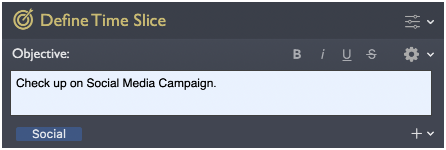
During the slice, stay-on-task reminders (visual, sound or spoken) nudge you back when you drift, and the Now & Later board gives you a place to park the “must reply to Sarah” thought in a few keystrokes and keep going. A built-in noise machine and focus soundscapes cover a noisy office. Breaks can lock the screen so you actually leave the desk. Afterwards, the log book and analytics show you how much focused time you put in, and over weeks, which hours of the day and days of the week you focus best.
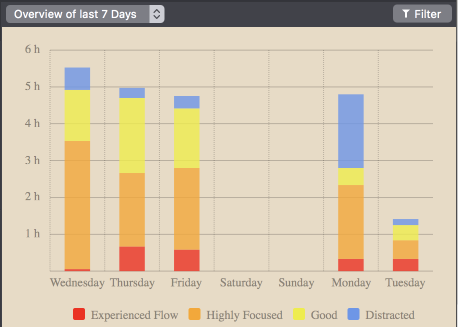
Vitamin-R can run as a normal window or as a dockless menu bar app summoned with a keystroke, it integrates with OmniFocus and Things so your task list and your focus tool work together, and it has been a one-time purchase of $29.95 since 2010, with a 14-day trial that includes everything. It is popular with people who have ADHD, who tend to find the explicit structure helpful.
The honest downsides: it is Mac only, with no iPhone companion. It has far more options than Flow or TomatoBar, which is a strength over months and a learning curve in the first hour. And it costs money up front, which is the wrong trade if a free countdown is all you need.
Pomodoro app or timeboxing app?
Pomodoro is one fixed recipe within a broader method called timeboxing: give a task a fixed slot of time and one clear objective, then stop when the slot ends. If the rigid 25/5 rhythm has never quite fitted your work, you are probably looking for a timeboxing app rather than a Pomodoro app. The difference in practice is flexibility of duration and an emphasis on the objective rather than the tomato count. I cover that angle, including the free ways to try it, in my guide to time boxing apps for Mac.
What three years of each actually costs
Subscriptions look cheap by the month and are not always cheap by the year. Here is the same three years for each app, at the prices I found in October 2026, so you can compare like with like.
| App | Three years of use |
|---|---|
| TomatoBar | $0 |
| Be Focused free tier | $0 (Pro lifetime unlock is a one-off extra) |
| Flow Pro | about $54 (36 months at $1.49) |
| Session Pro | about $120 (three years at $39.99) |
| Focus | $49 (updates stop after a year) or $129 lifetime |
| Vitamin-R | $29.95 (discounted upgrades to future major versions) |
None of these is expensive compared with an hour of a knowledge worker’s time. The point of the table is only that “free with Pro” and “one-time” are different shapes of commitment, and you should pick the shape before the app.
How to choose
- You want to try Pomodoro this week: the Clock app, or TomatoBar if you want it in the menu bar.
- You want a task list with session counts and iPhone sync, for free: Be Focused.
- You want the nicest-looking timer and are happy with a small subscription: Flow.
- You want to write an intention per session, sync everywhere and block distractions: Session.
- Your real problem is websites and apps, not the timer: Focus.
- You want the full method, on the Mac, paid once: Vitamin-R. Take the 14-day trial and run it for a working week before deciding.
FAQ
Does macOS have a built-in Pomodoro timer? Not as such. The Clock app’s timer, Siri and a Focus mode together give you a usable Pomodoro setup at no cost, with no session count or history. Every app in this guide exists to add what that setup lacks.
What is the best free Pomodoro app for Mac? TomatoBar, if a menu bar countdown with hotkeys is all you need. Be Focused’s free tier if you also want a task list with Pomodoro counts. Flow’s free tier if you want statistics and a nicer interface.
Which Pomodoro apps work from the menu bar? All six have a menu bar presence. TomatoBar and Focus live there entirely; Be Focused, Flow and Session show a countdown there alongside a main window; Vitamin-R has a dockless mode that hides it behind a menu bar icon and a keystroke.
Which one syncs with my iPhone? Be Focused, Flow and Session all have iPhone versions with sync. TomatoBar, Focus and Vitamin-R are Mac only.
Does Vitamin-R support the Pomodoro Technique? Yes. The classic 25-minute slice and 5-minute break rhythm is built in. Vitamin-R treats it as one preset rather than a rule, so you can lengthen or shorten slices as the task demands.
Is a Pomodoro app useful for ADHD? Many people with ADHD find that short, fixed commitments make starting easier and that an explicit objective keeps them on the task. Apps that prompt for an objective and nudge you back when you drift tend to help more than a bare countdown. My guide to focus apps for ADHD on a Mac goes into this.
Written by Frank Reiff, developer of Vitamin-R, a focus and time boxing app for the Mac from publicspace.net, which has made Mac software since 1996. See also my guides to time boxing on a Mac, focus apps for ADHD and deep work on a Mac.