Applies to macOS Ventura through macOS 27
The short answer: for occasional, simple renames the Finder’s built-in Rename is genuinely all most people need — start there. When you outgrow it, the best free step up is Transnomino or NameChanger; the best paid renamers are a close three-way call between A Better Finder Rename, Name Mangler and Renamer, which you should pick on feel after a trial. If your work involves photo/EXIF dates, RAW files, multi-step renames or tens of thousands of files at once, that’s the specific job the paid tools — mine included — are built for.
A disclosure before we start: I’m the developer of A Better Finder Rename, a paid renaming utility I’ve worked on since 1996. You’d rightly expect an article like this to end by recommending it, so it’s written the other way round — it starts with the free tools and is honest about where each of the paid ones, mine included, is and isn’t the right pick. Nobody needs a $30 utility for a job the Finder does for nothing.
What actually makes one renamer better than another
“Best” only means something against a job — and that’s true whatever you call the category: file renaming software, a batch renamer, a file rename tool. Across nearly thirty years of customer email, the features that separate a renamer people keep from one they uninstall are the same handful:
- A live preview of every new name before anything is touched, with collision detection. This is the single most important feature and the reason to use a dedicated tool at all: it’s the difference between a rename you can trust on 5,000 client files and one you find out was wrong afterwards.
- Multi-step renames in one pass — replace text, then strip characters, then add a date, then a zero-padded number — saved as one repeatable action.
- Metadata: reading a photo’s EXIF capture date, ID3 music tags, or EXIF/RAW data and building names from it — and keeping RAW+JPEG+sidecar file pairs in sync.
- Real regular expressions for the renames nothing else can express (see rename files with regex on a Mac for a cookbook of patterns).
- Scale and speed on very large batches.
- A sane pricing model — most serious Mac renamers are a one-time purchase, which matters if you dislike renting software.
- A Mac-native feel — right-click Services and Quick Actions, drag-in from the Finder, hotkeys, preview as you type. A tool built for the Mac fits the way you already work; a cross-platform port rarely does.
If your job needs none of these, you don’t need anything on this page except section 1.
The comparison at a glance
| Tool | Price (2026) | Live preview | Multi-step | Photo/EXIF dates | Regex | Best for |
|---|---|---|---|---|---|---|
| Finder (built in) | Free | ✓ (as you type) | — | — | — | Simple one-off renames |
| Transnomino | Free | ✓ | ✓ | ✓ (RAW, GPS) | ✓ | Best free all-rounder |
| NameChanger | Free | ✓ | limited | — | ✓ | Simple free find-and-replace |
| Advanced Renamer | Free personal / paid business | ✓ | ✓ | ✓ | ✓ | Cross-platform (also Windows) |
| ExifRenamer | Free | ✓ | limited | ✓ | — | Photos by capture date only |
| Name Mangler | ~$19 (one-time) | ✓ | ✓ | ✓ | ✓ | Power users who like node-style rules |
| Renamer | $21.99 (one-time / Setapp) | ✓ | ✓ | ✓ | ✓ | Clean UI, Mac + Windows |
| A Better Finder Rename | $29.95 (one-time) | ✓ (as you type) | ✓ | ✓ (RAW + sidecar pairs) | ✓ | Metadata, huge batches, the hardest jobs |
Prices are direct-from-developer as of August 2026 and change; check the vendor before buying. Several of these also appear on the Mac App Store, sometimes under a different name or a subscription (see the notes below).
1. The Finder’s built-in Rename — free, already installed
Since OS X Yosemite the Finder has had a real batch renamer that most people have never noticed: select the files, right-click, choose Rename…, and pick Replace Text, Add Text or Format. Press Rename and the whole batch is done; ⌘Z immediately afterwards undoes all of it.
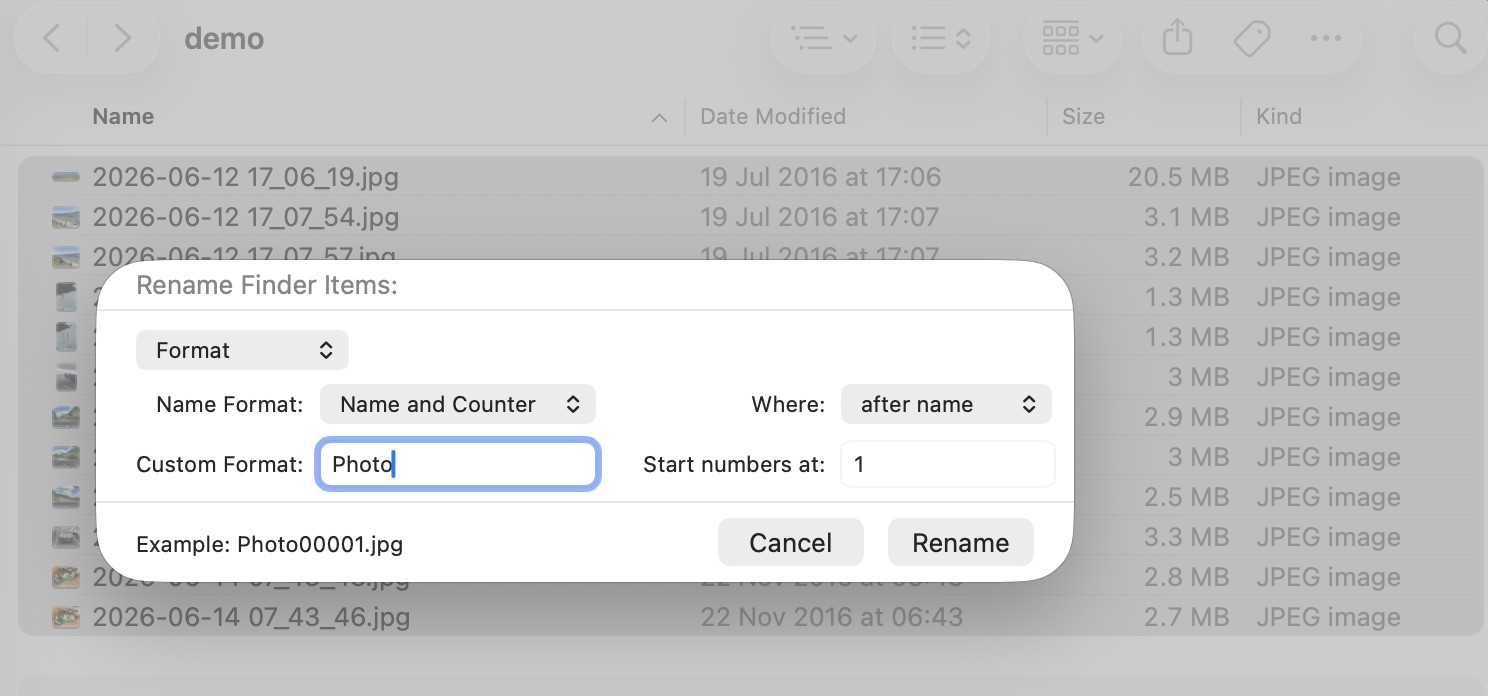
Format mode in macOS 26 and 27 — the counter now zero-pads to five digits automatically.
It’s the right answer for “replace this text everywhere” or “call them all Invoice 1, Invoice
2…”. Where it runs out of road: no metadata (it knows nothing about EXIF dates or music tags), no
patterns or regex, one transformation at a time, and number-padding you can’t control on older
systems. A fuller walk-through of the built-in tools is in the how-to guide.
2. The best free renamers
When the Finder isn’t enough but you don’t want to pay, two apps stand out:
- Transnomino — the best free all-rounder. Find-and-replace, prefixes and suffixes, extension changes, numbering, several actions chained together, and a live preview. If you want to try a “proper” renamer without spending anything, start here.
- NameChanger — simpler and older, focused on fast search-and-replace across a list of files with a side-by-side preview. Less capable than Transnomino but very easy to grasp.
- Advanced Renamer — powerful, actively developed, and notably cross-platform: if you rename on both Windows and a Mac and want the same tool on each, this is the one. Free for personal use; business use needs a licence. Worth knowing the Mac version is a separate build that trails the Windows one (no Mac command-line tool, no metadata writing, no localisation) and doesn’t feel especially Mac-native.
- ExifRenamer — free and specialised: it renames photos from their EXIF capture date and does that one job well. For anything beyond photos-by-date, you’ll want a general renamer.
For a lot of people, one of these free tools is the honest end of the search. Try them before you buy anything.
3. The best paid renamers
Three mature paid apps have kept Mac users happy for years. All three are one-time purchases (no subscription), all have live previews, multi-step actions, metadata support and regular expressions, and all offer a free trial. The differences are of feel more than capability, so the real advice is to trial the ones that appeal and keep whichever fits your head:
- Name Mangler (Many Tricks) — around $19 direct. A power-user favourite built around composable “stages” you can rearrange; fast, scriptable, and beloved by people who think in rules.
- Renamer (Incredible Bee) — $21.99, or included in a Setapp subscription; also available for Windows. A clean, approachable interface with a rule-stack model.
- A Better Finder Rename — my own, $29.95, covered honestly in its own section below.
4. A Better Finder Rename — the Mac-first power option
I’ve spent nearly thirty years on this one problem — on the Mac, and only on the Mac. That focus is the point: A Better Finder Rename isn’t a cross-platform engine with a Mac skin on top, it’s built to feel like part of the Finder. You add files by dragging them in or right-clicking a Service or Quick Action; it previews every change as you type and, in version 12, highlights exactly what changed; and you can drive it from presets you drop files straight onto without even opening the app. It’s been refined by customer request since 1996, which is roughly how long it takes to get the small things right.
Now the honest part. The good free and cheap tools have caught up on the basics of power renaming — multi-step actions, regular expressions, importing a rename list from a spreadsheet, even conditional rules and manual reordering are things Transnomino does for free and Name Mangler does for $19. So this isn’t a section about features only I have. It’s about depth — the handful of demanding jobs where A Better Finder Rename still pulls clearly ahead:
| The demanding jobs | ABFR | Name Mangler | Renamer | Adv. Renamer | Transnomino (free) |
|---|---|---|---|---|---|
| Filter actions (different rules per file type) | ✓ | ◐ | — | ◐ | ✓ |
| Direct EXIF incl. all RAW formats | ✓ | ◐ | ◐ | ✓ | ✓ |
| Lens / GPS-place / document & video metadata | ✓ | ✓ | ◐ | ◐ | ◐ |
| Music tags incl. FLAC / OGG | ✓ | ◐ | ◐ | ◐ | ✓ |
| Broadcast Wave production audio (Scene / Take) | ✓ | — | — | — | — |
| Date-ordered conflict resolution | ✓ | ◐ | — | ◐ | ◐ |
| Very large batches (100,000+) | ✓ | ✓ | ◐ | — | ◐ |
| Mac-native (not a cross-platform port) | ✓ | ✓ | ✗ | ✗ | ✓ |
✓ full · ◐ partial or limited · — not offered / undocumented. Compiled from each vendor’s own documentation, August 2026. The free Transnomino genuinely holds its own here — which is exactly why it’s my recommendation for anyone whose needs stop at this table’s easier rows.
Two of those rows are worth spelling out, because they’re where three decades of edge cases live:
- Broadcast Wave, by Scene and Take. Field and studio recorders bury take information inside the audio file; A Better Finder Rename reads it and renames by it. Nothing else on this page does — see renaming Broadcast Wave files.
- Date-ordered conflict resolution. When a rename would create duplicate names — say you shot a
burst of frames in the same second — most tools just tack on
1, 2, 3in whatever order they happened to process the files. A Better Finder Rename orders those by capture time, so the sequence stays true to the order you actually shot in. It’s the kind of detail you only notice when a lesser tool gets it wrong on a job that mattered.
The rest of the depth is cumulative: every major RAW format plus HEIC read directly (not second-hand through Spotlight), camera / lens / GPS-place and even document and video metadata through the tag engine, RAW+JPEG+XMP sidecar pairs kept renamed together, and a renaming engine tested on 300,000+ files with automatic fallback across rename mechanisms for network and third-party volumes.
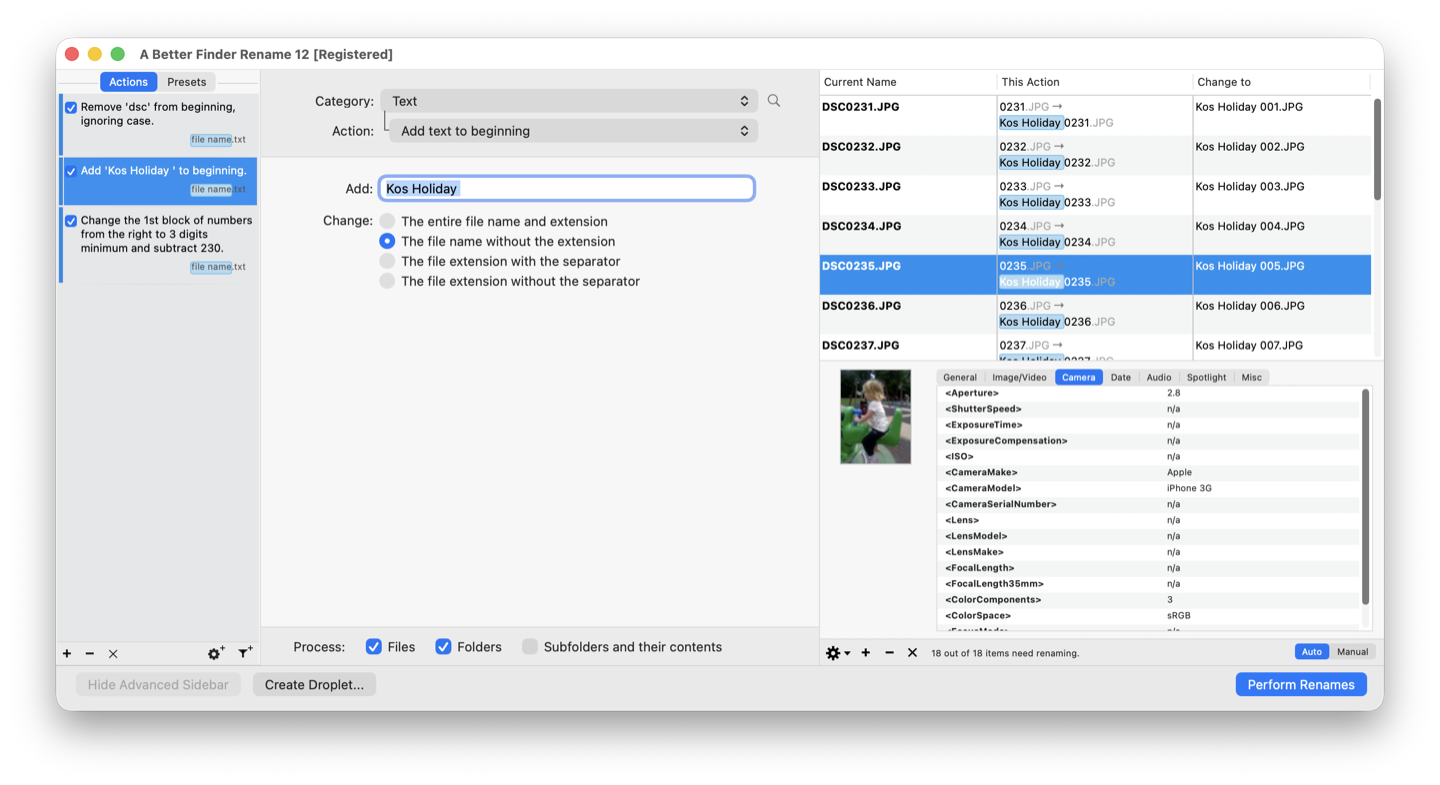
A multi-step action on the left, a live preview of every resulting name on the right — before a single file is touched.
It’s $29.95 as a one-time purchase (no subscription; minor updates free, major upgrades discounted) with a free trial so you can confirm it handles your job before paying. I’ll say it as plainly as in section 1: if your needs are modest, start with the free tools — Transnomino especially is excellent. A Better Finder Rename is what you graduate to when a lighter tool can’t express the rename you need, when the metadata goes deep, or when you need to trust a preview before touching fifty thousand irreplaceable files.
(It’s also on the Mac App Store as “Better Rename”, where Apple’s rules make it subscription-based. The version sold on publicspace.net is the classic one-time purchase.)
5. For the scripters: the Terminal is free and unlimited
If you live in a shell, macOS renames anything for free. zmv (built into zsh) handles pattern
moves; ExifTool is the command-line gold standard for photos-by-date. The
catch is the absence of a preview: a typo renames a thousand files wrongly in half a second with no
undo. Brilliant for scripted, repeatable pipelines; risky for one-off jobs on files that matter.
Which should you choose?
| You are… | Best pick |
|---|---|
| Doing an occasional simple rename | Finder — stop here, it’s free |
| Ready for more but not ready to pay | Transnomino (or NameChanger for pure find-and-replace) |
| Renaming on Windows and Mac | Advanced Renamer or Renamer |
| A power user who thinks in rules | Name Mangler |
| Renaming photos by capture date | A Better Finder Rename (RAW + sidecars) or ExifRenamer (free, basic) |
| Doing multi-step, metadata, regex or huge batches | A Better Finder Rename |
| Scripting a repeatable pipeline | Terminal (zmv, exiftool) |
There is no single “best file renamer for Mac” — there’s the best one for your job and your budget. For most people that’s the Finder or a free app; for the demanding cases it’s one of the three paid utilities, and the right way to pick between those is a free trial, not a review.
FAQ
What is the best free file renamer for Mac? For most people, Transnomino — it’s a genuine multi-action renamer with a live preview and costs nothing. NameChanger is simpler if you only need find-and-replace, and Advanced Renamer is the pick if you also rename on Windows. And don’t overlook the Finder’s built-in Rename for simple jobs.
Is a paid renamer worth it? Only for specific needs: photo/EXIF and RAW handling, multi-step saved actions, regular expressions, or very large batches where a trustworthy preview matters. If your renames are simple, the free tools are the honest answer — I sell one of the paid ones and I’ll still tell you that.
One-time purchase or subscription? The serious Mac renamers — A Better Finder Rename, Name Mangler, Renamer — are one-time purchases bought directly from their developers. Subscriptions mostly appear on the Mac App Store (where Apple’s model pushes them) or via bundles like Setapp.
Can macOS rename files without any app? Yes — the Finder’s right-click Rename… handles simple batches, and the Terminal handles anything if you’re comfortable scripting. See the full how-to guide.
Which renamer handles RAW photos and sidecar files? A Better Finder Rename renames RAW+JPEG+XMP sidecar pairs together so they stay matched; most lightweight tools rename only the file you point them at. For photos-by-date specifically, see rename photos by date taken.
Is there a Mac version of Bulk Rename Utility? No — Bulk Rename Utility, the well-known free Windows renamer, has never had a Mac build. The closest free Mac equivalent is Transnomino; if you want one bulk rename utility on both platforms, Advanced Renamer has a Mac version; and for the deep metadata jobs, A Better Finder Rename is the Mac-native step up.
Should I use an online file renamer? I’d advise against it. Uploading your files to a website just to rename them is slow, a privacy risk for anything confidential or client-owned, and blind to the metadata — EXIF dates, music tags — that makes batch renaming useful in the first place. Everything an online file renamer can do, the Finder’s built-in Rename does locally, for free, with undo.
Related guides
- How to batch rename files on a Mac — the full how-to for the built-in and free tools.
- Rename photos on a Mac — Finder names vs Photos titles vs exports.
- Rename photos by date taken — build names from EXIF capture times, RAW and sidecars included.
- Rename files from a spreadsheet or CSV — map old names to new ones prepared in Excel or Numbers.
- Rename files with regular expressions — which free tools understand regex, and a cookbook of patterns that work in all of them.
Frank Reiff is the developer of A Better Finder Rename, the Mac batch renaming utility in continuous development since 1996. Think a tool belongs on this list that isn’t here? Get in touch.