Applies to macOS Ventura through macOS 27
The short answer: a Mac keeps two unrelated families of dates for every file. The file-system
dates live in the disk’s catalogue and belong to the file as an object: Created, Modified,
Date Added (when the file arrived in its current folder) and Last Opened. The embedded
dates live inside the file’s own bytes and describe its content: a photo’s date taken (EXIF
DateTimeOriginal), a video’s creation-date key, the IPTC and XMP copies that Adobe tools write.
The Finder sorts by the first family and never looks at the second. Apple Photos and Final Cut Pro
sort by the second and almost never look at the first. That is why the same photo can sit on three
different days in three different windows, and why “fixing the date” so often changes nothing: the
wrong date got fixed. Find the date the app you care about reads, change that one, and the problem
goes away.
A disclosure: I’m the developer of A Better Finder Attributes, a paid utility that changes all of these dates in batches. This page exists because most of the support mail I get about dates is not about my software at all. It is about which date is which. The how-to work is in the guides linked from each section; this page is the map.
The dates a Mac keeps for a file
Six dates matter in practice. The first four are file-system dates; the Finder can show every one of them as a list-view column (right-click the column header). The last two are embedded in the file and the Finder cannot show or sort by them, except indirectly through Spotlight.
| What the Finder calls it | Where it lives | What sets it | What resets it |
|---|---|---|---|
| Date Created | the volume’s catalogue (kMDItemFSCreationDate) |
the moment the file was written to this disk | a download, an AirDrop, a cloud sync, an export, a restore, cp in the Terminal |
| Date Modified | the catalogue (kMDItemFSContentChangeDate) |
the last time the file’s bytes changed | any save; also any metadata write, because the bytes changed |
| Date Added | a Spotlight attribute (kMDItemDateAdded) |
the moment the file arrived in its current folder | moving it to another folder |
| Date Last Opened | a Spotlight attribute (kMDItemLastUsedDate) |
opening the file in an app | opening it again |
| date taken (embedded) | inside the file: EXIF DateTimeOriginal, plus IPTC and XMP copies in files that went through Adobe tools |
the camera’s clock at the shutter press | an editor that rewrites or strips metadata; a date-changing tool |
| video creation date (embedded) | inside the movie: Apple’s com.apple.quicktime.creationdate key, the ©day tag, the movie header |
the camera or the encoder | an editor’s export, a transcode, a date-changing tool |
Two things in that table do most of the damage.
Created is a property of the copy, not of the picture. It is “when did this file come into existence on this disk”. A photo shot in 2019 and downloaded from iCloud this morning was created this morning as far as the disk is concerned, and the Finder will sort it among today’s files. That is not a bug. The Finder is answering a different question from the one you asked.
Date Added is a property of the folder. It is what the Downloads folder sorts by, and it is why files you moved into a folder last week sit above files that have been there for years. Move the file somewhere else and Date Added becomes now; copy it back and it becomes now again.
The embedded dates, by contrast, are part of the file. They survive copying, downloading, AirDrop and cloud sync untouched, which is exactly why they are the dates worth caring about for photos and video, and why Photos and Final Cut Pro are built around them.
What copying does to the dates (measured)
“Copying resets the date” is the folk explanation, and it is only sometimes true. I checked the common ways of copying a file on macOS 26, starting from a file created on 15 January 2020 and last modified on 3 March 2021:
| How the copy was made | Created on the copy | Modified on the copy |
|---|---|---|
| Finder: Duplicate, or drag to another folder on a Mac disk | 15 Jan 2020 (kept) | 3 Mar 2021 (kept) |
Terminal: cp |
today | today |
Terminal: cp -p or ditto |
3 Mar 2021 | 3 Mar 2021 (kept) |
| Download, AirDrop, Dropbox / iCloud sync, an app’s Export | today | today, or kept, depending on the sender |
The cp -p row is the one nobody expects: macOS refuses to let a file be modified before it was
created, so when a tool restores the Modified date onto a freshly created file, the Created date is
pulled back to match it. The copy ends up “created” on its last-modified day. The same rule bites
when you set dates by hand: set Modified before Created and Created moves.
The Finder itself is well behaved. It is the things that are not Finder copies, the downloads and syncs and exports, that hand you a folder full of files all “created” this afternoon.
Which app reads which date
This is the part Apple does not document, so I measured it: around sixty files for Final Cut Pro and 127 for Photos, each with every date field set to a different, recognisable year, imported, and the result read back. The full priority chains and the method are in the two app guides; this is the summary that explains the disagreements.
| Sorts and groups by | Reads embedded dates? | Reads the Finder’s Created date? | |
|---|---|---|---|
| Finder | Created, Modified, Date Added, Last Opened, your choice | no | yes |
| Spotlight, Get Info “Content created” | derived from embedded dates for photos (IPTC first, then EXIF); the Finder’s Created date for movies | photos yes, movies no | movies only |
| Apple Photos | one capture date per item, fixed at import | yes: Apple key → ©day → movie header for video; IPTC → EXIF → rarer fields for JPEG |
almost never (last resort for stills, only for header-less movies) |
| Final Cut Pro | Content Created, fixed at import | yes: the Apple key only, and only with a time-zone offset, for movies; IPTC → EXIF → XMP for JPEG | yes, as the fallback whenever the embedded date is missing |
Read across a row and the classic complaints explain themselves:
- “The Finder shows the right date, Photos shows the wrong one.” The file was copied in with its Created date intact, but the embedded date is wrong or missing. Photos never saw the Finder date.
- “Photos is right, the Finder sorts them wrong.” The embedded date is fine and the Created date was reset by a download. This is the single most common date problem on a Mac, and the fix is to copy the embedded date onto the Created date: how to fix photo sorting in the Mac Finder.
- “I fixed the date and Final Cut Pro still shows the old one.” The fix went into a field Final Cut Pro does not read. For a movie it reads exactly one field, Apple’s creation-date key, and discards it if it has no time-zone offset: Final Cut Pro’s Content Created date.
- “Photos and Final Cut Pro show different times for the same clip.” Photos shows the time on the camera’s clock in the camera’s zone; Final Cut Pro converts to your Mac’s zone. Both are right: why Apple Photos shows the wrong date.
- “A JPEG from Lightroom will not move, whatever I do to the EXIF date.” It carries an IPTC Date Created that both Photos and Final Cut Pro rank above EXIF. Change both, or clear the IPTC one.
I have not run the same experiment on Lightroom Classic, DaVinci Resolve, Premiere Pro or iMovie. The recurring reports are that Lightroom takes a video’s capture date from the import, that Resolve ignores embedded dates and sorts by the file date, and that Premiere shows the header time in UTC (Coordinated Universal Time, the zero-offset reference clock every time zone is measured from). Treat those as reports, not results; the Apple apps above are measured.
The embedded dates, field by field
Photos and videos carry their dates in several places at once. Tag names below are ExifTool’s,
because exiftool -a -G1 -time:all photo.jpg is the quickest way to see every date a file holds,
and the group prefix tells you which block each one is in.
EXIF DateTimeOriginal (tag 36867, 0x9003) is the date taken: the camera’s clock when the
shutter fired. It is stored as a 19-character string in the form YYYY:MM:DD HH:MM:SS, colons in
the date included, with no time zone. Every camera and phone writes it; scanners often do not.
When people say “the EXIF date” they mean this one.
EXIF CreateDate (tag 36868, also called DateTimeDigitized) is when the image was digitised.
On a camera that is the same instant as the date taken, so most cameras write both with the same
value. On a scan it is the scan date, and the date taken may be absent. Photos reads it only as a
late fallback; Final Cut Pro ignores it.
EXIF ModifyDate (tag 306) is the last time the image data was edited. Neither Photos nor Final
Cut Pro uses it to place a picture, and some editors update it on every save, which is why a file’s
“EXIF date” can appear to change after a harmless edit.
OffsetTimeOriginal (EXIF 2.31, 2016 onward) is the time-zone offset for the date taken, such
as +02:00. Phones and recent cameras write it; most older cameras do not. Without it, every app
has to guess what “14:32” means, and the guesses differ: Photos takes a still as wall-clock time in
your Mac’s zone and leaves it alone, but takes a video without an offset as UTC and shifts it.
IPTC DateCreated and XMP photoshop:DateCreated are copies of the date taken written by
Lightroom, Photoshop, Bridge, Capture One and similar tools. They are supposed to agree with the
EXIF date. When they do not, because a tool changed one and not the others, the IPTC one wins in
Photos, Final Cut Pro and Spotlight alike. Any tool that changes a date taken should update all
three where they exist.
Movies have their own set: Apple’s creation-date key (Keys:CreationDate, written by iPhones
and by Apple’s own software), the classic QuickTime ©day tag (which can sit in two different
places inside the file, and the two are not equivalent), the movie header’s creation time, which
every movie has and which encoders fill with the moment of export, and sometimes EXIF-style dates
in camera MP4s. Photos reads the first three in that order. Final Cut Pro reads only the first, and
only with an offset.
Which date do you need to change?
Work from the symptom, not the tool.
| What you see | The date that is wrong | The guide |
|---|---|---|
| Files sort on the wrong day in the Finder, dates inside them are fine | the file’s Created date | fix photo sorting in the Finder for photos and video; change a file’s Created or Modified date for anything else |
| A photo lands on the wrong day in Photos, Lightroom or a web gallery | the embedded date taken | change the date a photo was taken |
| Whole shoot is off by a fixed number of hours | the camera clock or zone; the embedded dates are internally right | the time-shift section of the date-taken guide |
| Imported items land on the wrong day or hour in Photos | the first embedded field Photos reads, or a missing offset | why Apple Photos shows the wrong date |
| Clips show the copy date in Final Cut Pro | the Apple creation-date key is missing or has no offset | Final Cut Pro’s Content Created date |
| Scans or downloads carry a date only in their name | none exists yet; it needs writing from the filename | the filename section of the file dates guide |
| You want the dates and location gone before sharing | nothing is wrong; you want the embedded block removed | strip metadata from photos |
| You want the date in the filename so it sorts everywhere | nothing is wrong; you want it copied into the name | rename photos by date taken |
Reading every date a file holds
Before changing anything, look. Two free commands show the whole picture:
# every embedded date, with the block each one lives in
exiftool -a -G1 -time:all photo.jpg

# the file-system and Spotlight dates the Finder works from
mdls -name kMDItemFSCreationDate -name kMDItemFSContentChangeDate \
     -name kMDItemDateAdded -name kMDItemContentCreationDate photo.jpg
In the first listing, [ExifIFD] Date/Time Original is the date taken, [IPTC] Date Created and
[XMP-photoshop] Date Created are the Adobe copies, [Keys] Creation Date is the Apple video key,
[QuickTime] Create Date is the movie header, and [System] File Modification Date/Time and
[System] File Inode Change Date/Time are the file-system dates again, in ExifTool’s terms. If the
Adobe copies disagree with the EXIF date, you have found the reason a photo “will not move”.
In the second, kMDItemContentCreationDate is the date Spotlight derived from the file’s contents:
for a photo it follows the embedded dates, for a movie it is simply the Created date. The Finder’s
Get Info window shows the same value under More Info as Content created for many file types. You
cannot set it directly. Change the embedded date and Spotlight catches up.
Changing them
File-system dates. The Finder displays them and cannot change them. In the Terminal, touch -t
202401151200 file sets Modified, and SetFile -d "01/15/2024 12:00:00" file (Apple’s deprecated
but still working Command Line Tools) sets Created. Date Added and Last Opened are not meant to be
set at all; moving a file resets the first and opening it the second. The file dates
guide covers the routes and the traps.
Embedded dates. Apple Photos changes an item’s date (Image ▸ Adjust Date and Time…) and writes it into the file only on a regular export. The free ExifTool writes any field directly:
# set the three EXIF dates and the IPTC and XMP copies to 15 June 2024, 10:30
exiftool "-AllDates=2024:06:15 10:30:00" "-IPTC:DateCreated=2024:06:15" \
         "-IPTC:TimeCreated=10:30:00" "-XMP-photoshop:DateCreated=2024:06:15T10:30:00" photo.jpg

# remove the date taken altogether (leaves the rest of the metadata in place)
exiftool -DateTimeOriginal= photo.jpg

# remove dates and GPS together before sharing
exiftool -DateTimeOriginal= -CreateDate= -gps:all= photo.jpg
ExifTool keeps a backup copy with _original appended unless you tell it not to. There is no
preview, and a sign error in a shift recipe moves a whole folder the wrong way. The date-taken
guide has the RAW, scan and time-zone cases.
All of them at once, with a preview. This is what A Better Finder Attributes is for: it lists every date a file carries side by side, file system and embedded, and lets you set, shift, copy or remove any of them across a whole folder with each file’s current and new date previewed before anything is written. Its most used action is the one this page keeps coming back to, copying the embedded date taken onto the file’s Created date so that the Finder, Photos and Final Cut Pro finally agree. Since version 7.50 it writes Apple’s video creation-date key with its offset and keeps the IPTC and XMP copies of a photo’s date in step with the EXIF one, so a date changed once lands everywhere. It’s version 7, US$29.95 / €29.95 as a one-time purchase, with a free trial to check it against your own files.
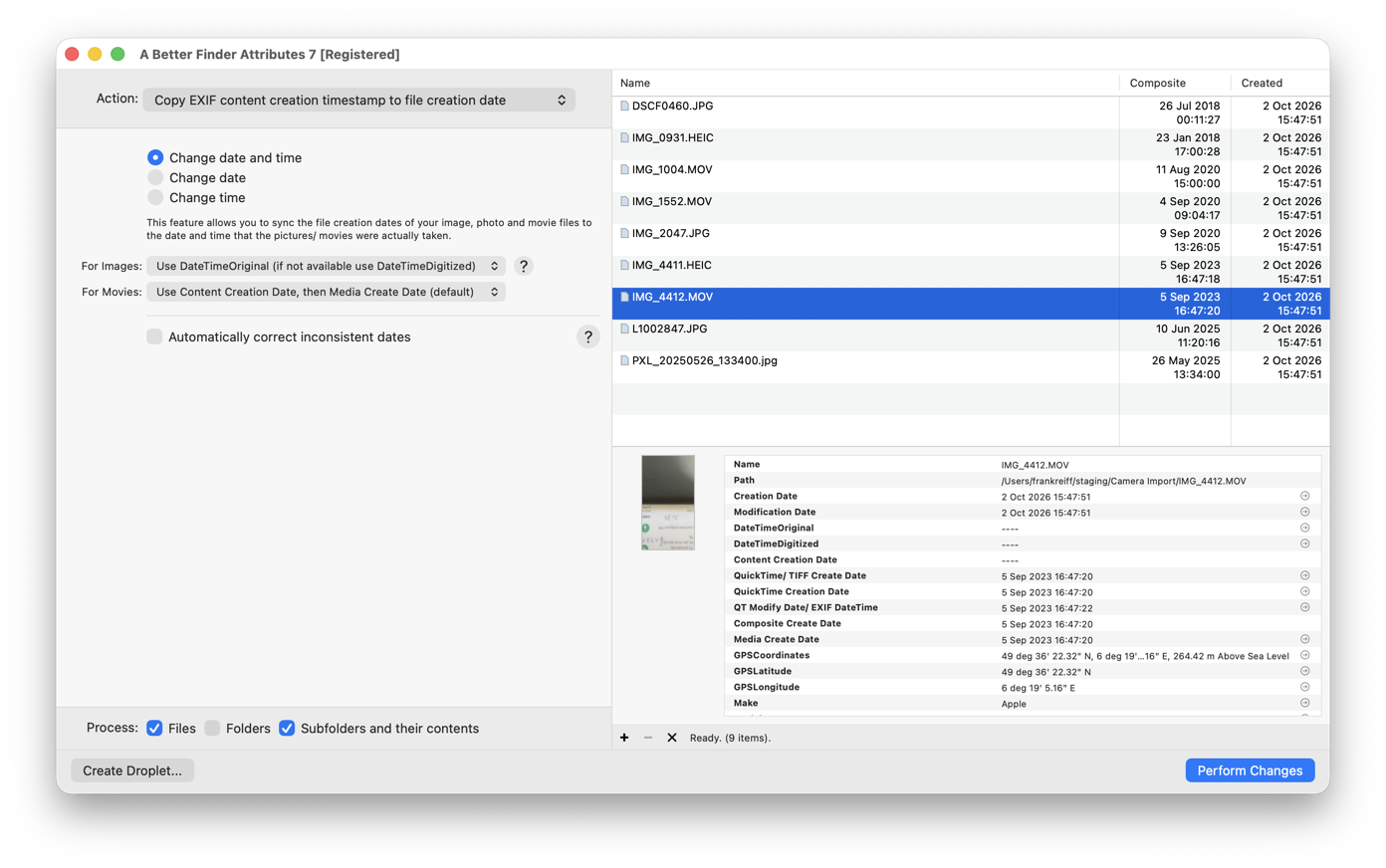
Every date in one window. The Composite column is the shooting date read out of each file; the Created column is what the Finder sees, and after a copy it reads today on every row. The info pane for the selected clip shows the same split: file-system dates at the top, all today, embedded dates below, all September 2023. The gap between the two halves is the whole problem, and the selected action closes it.
Common pitfalls
- Fixing the wrong family. Changing a file’s Created date does nothing in Photos; changing a photo’s date taken does nothing in the Finder. Decide which window you want to be right, then change the date that window reads. Usually you want both: set the embedded date, then copy it to Created.
- Trusting a single “date” column. Preview, Photos, Lightroom and the Finder each show one date and call it the date. They are not the same date.
- The Modified-before-Created rule. Set Modified earlier than Created and macOS pulls Created back to match. Set them in the other order, or let a tool that knows the rule handle it.
- Editors that rewrite metadata. Some apps update
ModifyDateon every save, some strip the IPTC block, some write a fresh©dayinto a movie on export. Keep a backup of originals before any bulk change. - A stale Adobe copy. A JPEG whose IPTC Date Created disagrees with its EXIF date will sort by the IPTC one in Photos, Final Cut Pro and Spotlight. Fix all copies or remove the stale one.
- Dates with no time zone in video. A naive creation date in a movie is read as UTC by Photos and discarded by Final Cut Pro. Write the offset.
FAQ
What is “Date Added” on a Mac? The moment a file arrived in the folder it is in now. It is a
Spotlight attribute (kMDItemDateAdded), not a property of the file’s contents, and it resets every
time you move the file to another folder. The Downloads folder sorts by it by default.
What is the difference between Date Created and Date Modified? Created is when the file was first written to the disk it is on; Modified is when its contents last changed. Both are file-system dates and neither has anything to do with when a photo was taken.
Does copying a file change its creation date? A Finder copy or duplicate on a Mac disk keeps
both Created and Modified. Downloads, AirDrop, cloud sync and app exports give the new file today’s
Created date. In the Terminal, cp resets both and cp -p keeps Modified but pulls Created back to
match it.
What is EXIF DateTimeOriginal? The date and time a photo was taken, as recorded by the camera’s
clock: EXIF tag 36867, stored as YYYY:MM:DD HH:MM:SS with no time zone. It is the field most apps
mean by “date taken”, and the one exiftool -DateTimeOriginal= removes or sets.
What is the difference between DateTimeOriginal and DateTimeDigitized? The original is when the
shutter fired, the digitised date is when the image became a digital file. On a camera they are the
same instant; on a scan only the digitised date is meaningful. ExifTool calls the second one
CreateDate.
Why does the Finder show a different date from Photos for the same picture? The Finder shows the file’s Created date, which the copy or download set. Photos shows the date embedded in the picture, which the camera set. Copy the embedded date onto the Created date and they agree.
Can I sort by date taken in the Finder? Not directly. The Finder sorts by file-system dates only. Either copy the date taken onto the Created date, or put the date in the filename and sort by name.
Why did all my videos end up two hours off? The camera wrote a creation date without a time-zone offset. Photos reads a naive video date as UTC and shows it shifted by your zone. Write the offset into the file, or shift the batch by the difference.
Which date does Spotlight use? For photos, the embedded date (IPTC first, then EXIF), exposed as
kMDItemContentCreationDate. For movies, the file’s Created date. You cannot set it directly;
change the underlying date and Spotlight re-indexes.
Frank Reiff is the developer of A Better Finder Attributes and A Better Finder Rename, Mac file-management utilities in continuous development since 1996. The how-to guides this page points to: change a file’s Created or Modified date, change the date a photo was taken, fix photo sorting in the Finder, why Apple Photos shows the wrong date and Final Cut Pro’s Content Created date. Get in touch with a date problem none of them covers.