Boring Old Menu Bar changes the color of the menu bar on macOS: black, white, Catalina grey or any color you pick, fully opaque, with separate settings for light and dark mode. So the menu titles are legible again on any wallpaper, and a black bar makes the MacBook notch disappear. Version 1.31 for macOS 27, version 1.28 for macOS 13 Ventura to 26 Tahoe, Sequoia and Sonoma included.
Free 14-day trial, one-time purchase. Buy for $9.95, and one unlock code works for both versions.


From the makers of A Better Finder Rename, A Better Finder Attributes and Big Mean Folder Machine. Mac software since 1996.
Since macOS 11 Big Sur the menu bar has been painted over your wallpaper: translucent, tinted, and on a busy picture hard to read. Sequoia, Tahoe and macOS 27 kept the idea. This app does not.
Boring Old Menu Bar gives the top bar a solid backdrop, so black text sits on a light bar and white text on a dark one, whatever is behind it. Choose a different color for light and dark mode and the app switches with the system. The default is the Catalina look, the last menu bar that was simply opaque.
macOS 26 Tahoe added a Show menu bar background switch under System Settings, Menu Bar. It gives you Apple's default grey and nothing else. Reduce Transparency, the other standard advice, changes the look of the whole interface. Boring Old Menu Bar changes only the bar, in the color you pick, on every display and in every Space.
Pick the black style on a MacBook Pro or MacBook Air and the notch vanishes into the bar. This is what our De-Notch-ifier did, and it has been folded into Boring Old Menu Bar. If you bought one, you have the other.
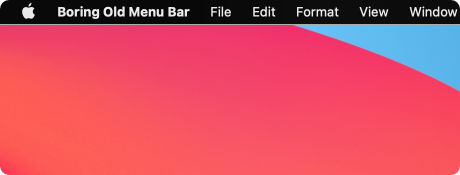
Optionally round the screen corners to match, from 3 to 10 pixels, each corner switched on or off on its own. Purely cosmetic, and off by default.
Six built-in styles plus your own custom colors, drawn here in the app's exact values.
The divider line under the bar can be a single pixel, a hairline or nothing at all, and the bar's height can be nudged a pixel either way to line up with your display.
Boring Old Menu Bar does not patch macOS, load a kernel extension or inject anything into the system. It changes your wallpaper: it renders a copy of your current desktop picture with a solid bar painted across the top, exactly where the menu bar sits, and sets that as the wallpaper. The menu bar you see is still Apple's, Liquid Glass and all. It simply has something opaque behind it.
Since version 1.29 the app renders that copy from the wallpaper file itself rather than taking a screenshot, so it needs no Screen Recording permission and works with the way macOS 27 draws the desktop. Dynamic wallpapers get the right frame for light or dark mode, the time of day or the position of the sun, and the picture is refreshed the moment the next frame is due. Apple's own pictures, colours and folder shuffles are read straight from the Wallpaper settings.
Because it works through the wallpaper, it works wherever the wallpaper does: on every display and in every Space. Switch the app off and your original wallpaper comes back.
Two builds, one app. Pick the one for your macOS; Apple menu, About This Mac, tells you which you have.
Apple silicon Macs
Download version 1.31Disk image. Renders wallpapers instead of screenshotting them, no Screen Recording permission.
Intel and Apple silicon Macs
Download version 1.28Zip archive. The last release for these systems; it keeps working and keeps its automatic updates.
Both builds are the same app with the same 14-day trial, and one unlock code works for either. Single User, Family, Small Business, Business and Enterprise licenses, as well as discounted and forever upgrades, are exclusively available in our own web store, with a 60-day no-questions-asked money-back guarantee.
All downloads, including older versions, are on the download page.
 Boring Old Menu Bar